VoIP Call Quality

Status
Not open for further replies.

keyspace

Joined
Dec 17, 2014
Messages
6
Reaction score
1
I have setup 3cx at a few of our clients sites and have found the call quality to be quite bad with VoIP.
All sites are running a Watchguard Router. 2 sites running xtm330 and 1 site with xtm26.

I have put it QOS on the router and also used traffic management to have guarantee badwidth but i am still having issues.
Site 1 has 100/5 connection
Site 2 has 20/20
Site 3 has 8/8

So they all have decent internet connection. I am using VoIP provider that is on the 3cx list.

Running Yealink phones. T42, at T46, T48 and W52
 
Hi,

I am not familiar with the routers you use, but about the call quality…
When do you having issues? If there is a lot of network traffic?
Do you have echo issues, stutter in audio?
Have you measured the ping time? This must be better than 15ms.
On what machine is 3CX PBX running?
 
Hey Keyspace,

Got a couple questions for you in regards to this. I got probably hmm 30-40 systems out there behind watchguard so know that setup fairly good :)

1) have you done a wireshark capture or do you have any captures of a call that the quality was bad? If so can you PM me with the capture? or throw it on a FTP site i can download it from and take a look.
2) who are you using for the voip provider?
3) is this a virtual server or physical that 3CX is running on? (If i had to guess you are virtual)
4) in the example with site 1-2-3 are all those sites running off a central 3CX or do they all have there own local systems?

In grads to your internal speeds yea they look decent but you cant just look at that. Example i have one location i no where gods country "Billings Montanna" there internet out there is not that best. On a decent internet connection if you ping 8.8.8.8 from that location the response time would be 110-120ms... Putting voice over that kind of latency not good...

So test from each location just ping 8.8.8.8 and see what you get back if you could post that would be great :)

Second test. You know the conference bridge? 700 or whatever your extension length is. Call it from a phone. Just one person. You will get hold music. listen to it for 4-5min. Does it get choppy at times or does it sound clean?
** Reasoning for this test** So when you are using a VOIP provider all the audio on the call is bring proxies through the server. If the server is for whatever reason under load "Virtual servers cause this a lot of times" then it will cause delay in the audio which equals choppy calls. By calling the conference bridge it eliminates the outside elements but still produces a similar situation on the inside for choppy call test.

Give that all a shot and see what you end up with. If nothing seems to be working PM me and ill jump on with you and take a look.
 
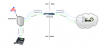
Just for kicks and giggles. I have attached a pic if your at all curious on how the call setup/flow with SIP trunking works.
There are 2 elements. SIP and RTP
SIP = Call setup
RTP = Audio

So in the pic you can see how all the RTP traffic has to go through the 3CX server. Since it is the audio proxy when you configure the SIP trunk on there.

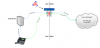
In cases where we have audio issues due to virtual servers and such we will put in a Sangoma mini SBC. Not overly expensive.
See the second pic. Kind of explains what it does.
 

Attachments

  • call_flow.png
    call_flow.png
    204.1 KB · Views: 3,301
  • call_flow_with_a_sbc.png
    call_flow_with_a_sbc.png
    186.8 KB · Views: 3,300
Sorry to resurrect an old post, but I'd like to get some feedback regarding a similar issue.

Our company has 3 offices on a centralized 3CX system, two in Texas and one in Arkansas. We too experience call quality issues, though it seems to happen more frequently at our AR office. Here's an overview of the systems and how call flow is working.

Texas HQ: WatchGuard XTM 330 firewall, running 11.10.7.B500498; 3CX v14 SP3 on a Dell PowerEdge R210 running Win 7 Pro; TWCBC provides SIP

Texas 2: WatchGuard XTM 33 firewall, running 11.10.7.B500498; TWCBC provides SIP

Arkansas: WatchGuard XTM 21 firewall, running 11.6.8.B451352; NexVortex provides SIP

Incoming calls to Arkansas frequently have no audio, drop, and are generally of poor quality. Calls at our Texas offices are considerably better, though there are some similar issues, but they are infrequent.

I do not have any captures of poor quality calls, unfortunately.

I've attached a file with sample pings to 8.8.8.8 over 60 seconds.


tsukraw said:
Hey Keyspace,

Got a couple questions for you in regards to this. I got probably hmm 30-40 systems out there behind watchguard so know that setup fairly good :)

1) have you done a wireshark capture or do you have any captures of a call that the quality was bad? If so can you PM me with the capture? or throw it on a FTP site i can download it from and take a look.
2) who are you using for the voip provider?
3) is this a virtual server or physical that 3CX is running on? (If i had to guess you are virtual)
4) in the example with site 1-2-3 are all those sites running off a central 3CX or do they all have there own local systems?

In grads to your internal speeds yea they look decent but you cant just look at that. Example i have one location i no where gods country "Billings Montanna" there internet out there is not that best. On a decent internet connection if you ping 8.8.8.8 from that location the response time would be 110-120ms... Putting voice over that kind of latency not good...

So test from each location just ping 8.8.8.8 and see what you get back if you could post that would be great :)

Second test. You know the conference bridge? 700 or whatever your extension length is. Call it from a phone. Just one person. You will get hold music. listen to it for 4-5min. Does it get choppy at times or does it sound clean?
** Reasoning for this test** So when you are using a VOIP provider all the audio on the call is bring proxies through the server. If the server is for whatever reason under load "Virtual servers cause this a lot of times" then it will cause delay in the audio which equals choppy calls. By calling the conference bridge it eliminates the outside elements but still produces a similar situation on the inside for choppy call test.

Give that all a shot and see what you end up with. If nothing seems to be working PM me and ill jump on with you and take a look.
 

Attachments

Hey,
I will shoot you a PM.
 
Gerrald, a few questions:
1. Are the phones in the 2 remote sites (TX 2 and AR) connected to the PBX over a VPN, looking at the PBX's LAN IP, or do they look at its WAN IP address (assuming it's NAT'd throught the local firewall)?

2. The AR location has high latency to 8.8.8.8, which means it probably has higher latency to TX. I would guess that you have FIOS or similar (consumer grade fiber) in the TX offices, and DSL or Cable Modem in AR. correct? I would suggest keeping an eye on your internet usage in the 3 offices using a tool such as MRTG or similar (you can use it to monitor your firewall's WAN port using SNMP)

That's where I'd start....
 
SBCs are the way to go for spaces with three to five "phones" or more (choose your soft or hard phones..). I even use an SBC for the office which has the PBX on the LAN. Those RasPi SBCs are dirt cheap yet very effective.

Cleared up quality issues over the VPNs to a colo back in the day.. though I did some QoS back then to keep those slow links happy for voice.
 
So, firstly, @tsukraw has been very helpful with cleaning up our configuration. Thank you very much, @tsukraw! I would recommend him to anyone looking for a 3CX tech.
 
MTBrooklyn said:
Gerrald, a few questions:
1. Are the phones in the 2 remote sites (TX 2 and AR) connected to the PBX over a VPN, looking at the PBX's LAN IP, or do they look at its WAN IP address (assuming it's NAT'd throught the local firewall)?

2. The AR location has high latency to 8.8.8.8, which means it probably has higher latency to TX. I would guess that you have FIOS or similar (consumer grade fiber) in the TX offices, and DSL or Cable Modem in AR. correct? I would suggest keeping an eye on your internet usage in the 3 offices using a tool such as MRTG or similar (you can use it to monitor your firewall's WAN port using SNMP)

That's where I'd start....

@MTBrooklyn Here's answers to your questions:

1. The phones at the remote sites were looking at the FQDN of the 3CX server, I believe. However, we were having issues with proper provisioning of the phones using this method, so all the remote phones are now pointing to the internal IP of the 3CX system. All office are connected via hardware VPN.

2. The AR office is on 100/20 coax, because there would have been a buildout cost for fiber to the location they just moved into. TX HQ and TX 2 are on 50/50 and 20/20 fiber, respectively, though through different providers. I'll look into the internet usage, but I doubt it will be remarkable. There's only 4 consistent users in the office.
 
ian.watts said:
SBCs are the way to go for spaces with three to five "phones" or more (choose your soft or hard phones..). I even use an SBC for the office which has the PBX on the LAN. Those RasPi SBCs are dirt cheap yet very effective.

Cleared up quality issues over the VPNs to a colo back in the day.. though I did some QoS back then to keep those slow links happy for voice.

@ian.watts So you've provided the perfect segway for my next question.

Our current vendor is recommending this very idea. He's configuring a raspPi with 3CX software SBC to deploy at the AR office in hopes of providing better call quality and connection. However, this software SBC doesn't connect to the WAN interface, only LAN. It sits behind the firewall. I'm not sure how it's going to improve upon the adjustment made yesterday where the numbers for our AR office are finally going over NexVortex SIP trunks. That change alone improved the situation, though there's still room for improvement.

Another contributor here is suggesting installing a hardware SBC rather than a software SBC. This contributor states that the software SBC will not provide any real improvement, based on numerous installations they have done with very similar deployments and configurations to our own. He provided two diagrams that I'm attaching to this post. I'd like to get the communities feedback on this, please.

The images are too large to attach, so here are some snapshot links.
Call Flow with 3CX SBC
Call Flow with Physical SBC at Remote Office
 
Be great to get some feedback on my last post.
 
I won't argue the differences/benefits between the 3CX SBC and "hardware SBCs".

But.. you do NOT need a VPN or use the LAN to connect a 3CX SBC to the PBX. The three I employ connect to the WAN address for the PBX. I multi-home my PBX, though frankly in my config I may just as well hang it on the WAN alone. Makes failover and migration options much easier. I still need to up this client to 14.. one of the adds is I should be able to use DNS hostnames instead of IP addresses.. makes migration/failover a bit easier that way.

Then again.. the only failure is that friggin' Comcast connection down in Oakland.. one of the remote offices.. good times.
 
Status
Not open for further replies.

Latest Posts

Members Online Now

Forum statistics

Threads
111,844
Messages
589,330
Members
164,680
Latest member
JV J