VoIP speaker

Status
Not open for further replies.

IDam

Silver Partner
Advanced Certified
Joined
Oct 21, 2021
Messages
5
Reaction score
0
Hi,
A customer of mine has a 2N VoIP speaker (https://www.2n.com/en_GB/products/ip-audio/2n-sip-speaker-horn) with some preset announcements, such as "call for department 1", "call for department 2", etc.
These messages are played by calling the extension (configured on 3CX) recorded on the speaker (extension 305) and then pressing the key related to the message: 1, 2, etc. [The message selection is transimitted as a DTMF tone.]
The problem is: I need to make the department's extension ring along with the speaker playing the related message.
For example, extension 201 together with extension 305 + key 1 in DTMF, so that while the phone is ringing, the speaker plays the audio message.

I really appreciate any help you can give me.
 
What happens if you use ring groups?
 
Hi kieferschild,
in the ring groups I can insert only the extension without the dtmf key to reprocuce the recorded message.

I need to insert the extension with the DTMF tone to reproduce the correct message.
For example:
RING GROUP 1:
- Extension 203 and extension 305 + 1 dtmf

RING GROUP 2:
- Extension 204 and extension 305 + 2 dtmf

RING GROUP 3:
- Extension 205 and extension 305 + 3 dtmf

thanks for any other suggestion
 
There is no way to append the DTMF. Further, using a ring group won't work because as soon as the speaker answers the call, the other phone will stop ringing.

You should be able to emulate what you are trying to achieve with a Call Flow Designer (CFD) application.

1. Transfer the original call to the CFD extension
2. Have the CFD invoke a MakeCall between an IVR (with the correct prompt) and the speaker
3. Transfer the call to the correct extension

This approach does not utilize the speaker's built in pre-recorded message, but it accomplishes the same thing using the IVR prompt.
 
  • Like
Reactions: IDam and Evolute IT
Hi Matthew,
thanks for your suggestion!
I've created a CFD application following your instructions and its work fine.

Now I've a little issue with the extensions created by CFD.
On my 3CX these extensions have the following number:
- 831
- 832
- 833
These extensions not seen like a normal extension.

I need to use these extension like a destination when a normal extension are in DND or not registered status.

There is a way to do this?
 
I'm not sure I follow your question. You can transfer any call to these extensions just like any other extension. To test, you can call the extension directly from your phone. But you are right, they are a special type of extension that doesn't have things like presence status, or the option for voicemail, etc. It's just a place where you can route calls.
 
HI,
I'll try to explain my setup better.

The three extensions created with CFD are used only for internal calls.

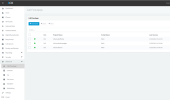
CallFlowApps.png
In this installation there are users that using IP phones (Fanvil X7) and other users that using the 3CX application on smartphones.

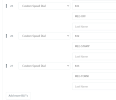
On the IP phones I have added three Custum Speed Dial but on the 3CX Smartphone App don't see the Custom Speed Dial.

CustomSpeedDial.png

From 3CX Smartphone App I can call the CFD extension but I can't see it with the list of extensions.

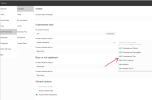
To solve this issue, I've think to cancel the Custom Speed Dial and create three "virtual" extension and setting the Call Farwarding to the CFD extension but isn't possible.

CallForwarding.png

No way?
 
HI,
I'll try to explain my setup better.

The three extensions created with CFD are used only for internal calls.

View attachment 34671
In this installation there are users that using IP phones (Fanvil X7) and other users that using the 3CX application on smartphones.

On the IP phones I have added three Custum Speed Dial but on the 3CX Smartphone App don't see the Custom Speed Dial.

View attachment 34670

From 3CX Smartphone App I can call the CFD extension but I can't see it with the list of extensions.

To solve this issue, I've think to cancel the Custom Speed Dial and create three "virtual" extension and setting the Call Farwarding to the CFD extension but isn't possible.

View attachment 34672

No way?
Do external number and put in 832 instead of system extension

(In management console it's forward to number and lets you freeform a number)
 
Status
Not open for further replies.

Members Online Now

Forum statistics

Threads
111,831
Messages
589,277
Members
164,660
Latest member
RJenkinsROCK