W60b Keeps failing authentication

Status
Not open for further replies.

DCB

Bronze Partner
Basic Certified
Joined
Oct 5, 2021
Messages
42
Reaction score
2
This is a stun setup.
As the title says. The odd think is, I've reset the W60b back to factory and re-provisioned it. It registers itself just fine. However, activity log shows "Reason: Credentials don't match, check that authorization-ID and password match the ones in extension settings"
Odd since I just re-provisioned from scratch.

Eventually, authentication fails 5 times and the WAN IP is blacklisted.
Looking at 'Accounts' on the W60b, it says it's registered. I've tried copy/pasting the extension password from 3cx into the account registration page, but that doesn't help.

Only solution I've found is to white-list the WAN IP of the phone. Authentication failures are still showing in the logs.

3CX version is 18 update 6
 
Check the other accounts on the device. Perhaps you have other accounts and they have the wrong credentials
 
@DCB
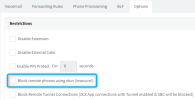
Please remember that to provision a DECT device using the STUN method you need to disable the "Block remote phones using stun (Insecure!)" for each and every extension assigned to the W60 device.
You can disable it by editing the appropriate extension(s) and navigating to the "Options" tab:
1675414603294.png
 
Thanks for everyone's replies. I should note that this WAS working and only recently started to fail.
CentrexJ: There are no other devices on the account.
JohnS: I watched the videos and everything is set appropriately. I also cross-referenced this setup with another setup I have. No diff.
Aram: Yup, that's not checked.

Again, this was a working install. The only solution I found was to white-list the WAN IP. I'm still getting authentication failures in the activity log, however the phone is functioning as expected... Which is odd because if its failing, then it should not work.
 
@DCB unfortunatly STUN is susceptible to a number of things, and you would have to troubleshoot it yourself using tools like wireshark in order to understand what is happening.

Do you have the option to install an SBC at that site? Even temporarily as a test just to see if something changes.
 
I had exactly the same issue with a remote W60B. Was working ok until the last upgrade then wouldn't register. IP was not blacklisted.

I set up a port forward for 5065 to the phone in the router, restarted the phone and it worked.
 
I had exactly the same issue with a remote W60B. Was working ok until the last upgrade then wouldn't register. IP was not blacklisted.

I set up a port forward for 5065 to the phone in the router, restarted the phone and it worked.

You should expect all kinds of issues with STUN (even it it worked fine for months/years before). The upgrade makes no difference at all, it was just coincidental.

Install a 3CX SBC whenever possible, otherwise make sure you portforward you W60B SIP port, RTP ports, and also disable SIP ALG on your modem and router / firewall. https://www.3cx.com/docs/3cx-tunnel-session-border-controller/

And on the other side of things, your PBX Firewall checker should also pass once the same is done for the PBX ports, very important when running remote phones.
 
Status
Not open for further replies.

Members Online Now

Forum statistics

Threads
111,832
Messages
589,285
Members
164,662
Latest member
DejanMDS