- Joined
- Jul 13, 2023
- Messages
- 5
- Reaction score
- 0
Hello Team,
Kindly advise on the following issue that I am having concerning the registration of 3 Yealink Handset extensions (W56H) on a W70B Yealink Base.
I have successfully linked the DECT on 3CX by following this KB article https://www.3cx.com/sip-phones/yealink-dect-phones
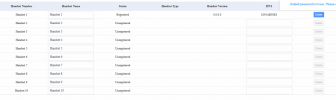
When I try to go on the GUI of the W70B I can see that 'Handset 1' is registered but without an account (Attachment 1).
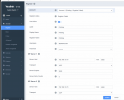
So I tried to register an account based on the 3CX user credentials, it says 'Register Failed' (Attachment 2)
Please help and thanks in advance.
Regards
Vinesh
Kindly advise on the following issue that I am having concerning the registration of 3 Yealink Handset extensions (W56H) on a W70B Yealink Base.
I have successfully linked the DECT on 3CX by following this KB article https://www.3cx.com/sip-phones/yealink-dect-phones
When I try to go on the GUI of the W70B I can see that 'Handset 1' is registered but without an account (Attachment 1).
So I tried to register an account based on the 3CX user credentials, it says 'Register Failed' (Attachment 2)
Please help and thanks in advance.
Regards
Vinesh