Warning 30051 Unidentified Incoming Call. Review INVITE and adjust source identification

Status
Not open for further replies.
@TPR3CX as I can see your partner opened a ticket yesterday, the response was from our side within the first 30 minutes and then after some clarification and questions and we asked for logs in order to check exactly what is happening and how the calls come into the PBX. Please check this with your partner and also provide us the requested files and information in order to be able to check exactly how the calls come to the PBX.
 
@TPR3CX as I can see your partner opened a ticket yesterday, the response was from our side within the first 30 minutes and then after some clarification and questions and we asked for logs in order to check exactly what is happening and how the calls come into the PBX. Please check this with your partner and also provide us the requested files and information in order to be able to check exactly how the calls come to the PBX.
I have confirmed with Flowroute that the server under the new IP address is sending ACKs with the old IP address even though the new IP address is listed in the server. I posted the output from FlowRoute above. @NikosT_3CX I just found a Reddit thread that seems to describe the problem I’m having and the solution recommends is to release my FQDN from my license and reapply it but I don’t see a confirmation of it working before I decide to try it. This is the link to the thread on Reddit. https://www.reddit.com/r/3CX/s/0G2DtvrHVk
 
@KyriacosS_3CX is there a way we can get some sort of escalation? My 3CX partner has even opened a case with 3CX and have not received any responses.
Hi,

If there is a ticket open then the team will get to it soon, and it might be better not to have you trying other things in the meantime that might complicate the troubleshooting.

Best,
KS.
 
@TPR3CX do not release the FQDN, if you do this you wont be able to reach your PBX.
Send us the files in the ticket, we will check it and advise what is exactly happening.

Note : dont read Reddit as the solution they said, will never work :)
 
@TPR3CX do not release the FQDN, if you do this you wont be able to reach your PBX.
Send us the files in the ticket, we will check it and advise what is exactly happening.

Note : dont read Reddit as the solution they said, will never work :)
Roger that. I don’t have access to the ticket, my 3CX partner does. So we can limit the back and forth, what files do you need so I can proactively have them ready for him in the morning.
 
You will need to set Logging to Debug, start a packet capture, make a few calls that exhibit the issue and choose to generate a support package when you stop the capture. That is generally the base requirement.
 
I can do that now if you tell me where to email it, I’ll have it for you in 10 minutes
 
The support team will reach out as needed. Feel free to generate, but they might ask for additional, case specific, data.
 
The support team will reach out as needed. Feel free to generate, but they might ask for additional, case specific, data.
OK.. I just emailed my 3CX partner the support info zip file and the event logs.
 
My 3CX support partner made me refresh the license, then delete and recreat the SIP trunk this time using SIP authentication. Now I get calls incoming and outgoing, but all incoming calls now only go to the main route which is an auto attendant and will not route DID calls to their respective associated extensions. It’s like every time I make some sort of progress, something else pops up. The incoming routing per DID was working before but with the new SIP trunk, now it does not. The DIDs are in the trunk and assigned to their extensions but the calls get route to the main line instead. This has been the worst experience ever. It’s never been like this with previous major version upgrades.
 
Check E.164 processing and also in Debug log if the SIP requests are showing the incoming DID the way you had them configured.
 
I am not sure why your partner isnt working with you... This is for what we are here. Ask them to help you checking the logs why your dids are not going to your extensions.
 
I believe I have an actual solution, though untested. I will confirm and then share the results because I am not the only one having this issue. 3CX should be more forthcoming with their support of a known issue.

For a Flowroute 3CX trunk to accept calls from a forwarded number the inbound caller ID setting must be just right. We had this issue with previous versions but 3CX made it easy to adjust the inbound parameters.

With the V20 update they intentionally removed the settings from the template that worked and removed access to easily adjust them. You now must download the template, add in what 3CX removed, upload the template, add a new trunk, then re-add your DID's to the trunk and put all the pieces back together since 3CX has removed any way to make this simpler. This may seem easy if you have a few DID's but I have to do this with several hundred.

Here is what needs to be added to the template:
<field name="Source" custom="" parameter="RequestLineURIUser">$LineNumber</field>
<field name="ParameterIn" custom="" parameter="RequestLineURIUser">$CalledNum</field>

I'll confirm this works and share with everyone.
Since 3CX V20 was released, we only had one Flowroute trunk that worked since it was a 64SC license that was updated from v18. Anything below 16SC, the build was different. On every other instance we struggled with Flowroute dropping all call that are forwarded to a DID on the instance – this is a considerable number of calls. Since Flowroute is a 3CX supported trunk, I went to 3CX for support, used the remainder of our paid support with 3CX, Flowroute support and had another 3CX partner open separate cases with 3CX using their accounts. I came here to the forums and the 3CX experts also were unable to provide a working solution.


The problem was line 90 in the 3CX Flowroute trunk

<field status="readonly" name="ParameterIn" custom="" parameter="ToUserPart">$CalledNum</field>


It should be

<field status="readonly" name="ParameterIn" custom="" parameter="RequestLineURIUser">$CalledNum</field>


3CX or Flowroute could not come up with a working solution.


The solution seemed ridiculously simple: Export the template from the working trunk and import it to an instance where you have a Flowroute trunk. Sometimes 3CX would reject the template citing incorrect format. Sometimes it would import but the trunk was not able to make outbound calls. Nothing worked. Even though 3CX and Flowroute both had all the information in front of them and were aware this was an issue with V20, both were feeding me instructions from v18 which were to make changes to settings that did not exist anymore in V20 at the time. Our only work around was to either add DID’s that were forwarded to a DID on the instance to the trunk or add a rule. This solution seemed reasonable and perfectly acceptable to 3CX and Flowroute. The assumption was that we would have the numbers readily available and problem solved. The reality is that each customer used has about 16 or more marketing DID’s that forward to their MPN, and most customers don’t even know about most of them. It was thousands of numbers. I continued to work on this here and there when I had time, but there were limitations and other problems. Pro licenses behave differently than Enterprise like we use and 8SC Enterprise behave differently than 16SC and higher, so testing was not as easy as simply deploy a throw away test instance. 3CX V20 builds were very inconsistent for months. In the last few months 3CX has gone through several major updates and has become consistent with the builds. Just last week I was finally also able to deploy a new instance with a 32SC Enterprise and import the exported working trunk – something that has failed every test for the last year or more.


To summarize - depending on your 3CX license and build version, you may now be able to edit and import the Flowroute provider template and have a fully working Flowoute trunk.
 
Regarding your comment, please note that in Update 9, you can click the three dots next to the provider under Voice & Chat and select View Template.

From there, you can create a copy of the template (using a unique name) and migrate the trunk to the new template. Once this is done, you may modify the required parameter and then click Save and Apply.

Please note, however, that if you change the source of the called number to the Request-Line URI, the number will no longer be presented in E.164 format. The value in the Request-Line URI is typically provided in national format.

As a result, any DIDs configured on the SIP trunk would also need to be entered in national format for inbound matching to work correctly. Please also be aware that this change may affect SMS functionality if SMS is currently in use on the trunk.
 
  • Like
Reactions: BrunoI_3CX
The Flowroute template in Update 9 is already updated. The only thing you need to do (if you are using the default Flowroute template) is open the trunk and click "Sync Template" on top. This will update your template to the latest settings.
 
Had to update 400 or so DID's to remove the +, but no more 30051 warning. Thanks!
 
For future reference, DIDs can be exported from Reports > Inbound Rules Report to a CSV file, then modified and re-imported.

Steps:
  1. Export the DIDs to CSV.
  2. Modify the CSV to match the required import format and remove any header row.
  3. Import the CSV from the trunk's DID section on the target system.
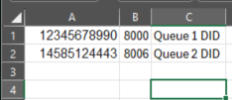
Required import format:
DIDDesintationName (optional)

So for example
12345678990, 8000, Queue 1 DID
14585124443, 8006, Queue 2 DID

1782235984768.png
 
Status
Not open for further replies.

Members Online Now

Forum statistics

Threads
111,831
Messages
589,277
Members
164,660
Latest member
RJenkinsROCK