WARNING! You need to assign an extension user System / Root privileges. If the current 3CX administrator does not have an extension you need to ...

Status
Not open for further replies.

FredyWenger

Customer
Joined
Jun 18, 2018
Messages
104
Reaction score
4
First, for what reason an account have to have this rights (I don’t understand that)?
I have updated to 18.0 (Build 441)
The console says: “Your system is up to date”

As I am the system owner, I have assigned the group “System owner” to my user account.
The problem is, that the system doesn’t seems to save the change.
The error message doesn’t go away and my account is set back to the group “User”, if I check the groups again.

What are the consequences, if the error message is showed?
What to do now?


Thanks for any feedback
 
Extensions with the System Owner can see the Admin page in the webclient (where everything is slowly migrating). See https://www.3cx.com/blog/docs/management-security-roles/. There is no "system owner" group by default.

It does not have to be an existing extension, we create one and hide it from DEFAULT:

Log into management console (not web client)
Create System Owner extension [note: created during new installs now]
Create "System Owner Group" group with System Owner as a member (can be done in one step)
Set System Owner extension as the System Owner role of the System Owner Group
Set System Owner in DEFAULT group to be a User
Remove System Owner from DEFAULT group
 
Thanks for the fast reply.
But please answer my questions:
For what reason an account has to have this rights?

What are the consequences, if the error message is showed?

As I wrote, I want to change my existing account from the "user group" to the "system owner" group), but it don't store the new group
=> Any idea why?


If I really have to create a new "System Owner Extension", I'm not able to follow your instructions:
"Create System Owner extension":
-> You mean a new user with "fake" data and a not existing "fake" extension number
--> Users - add...?
"Create "System Owner Group" group with System Owner as a member (can be done in one step)":
-> Where to add the "System Owner group"?
"Set System Owner extension as the System Owner role of the System Owner Group":
-> Where to set System Owner extension as the System Owner role of the System Owner Group"?
"Set System Owner in DEFAULT group to be a User":
-> Where to set System Owner in DEFAULT group to be a User"?
"Remove System Owner from DEFAULT group"
-> Where Remove System Owner from DEFAULT group?

Sorry, but I'm not a system engineer which has the administration of the 3cx as daily business...
Thanks for a further feedback
 
Without a system owner, eventually you'll be able to do less and less in terms of administration. Eventually the old management web panel is going away. [edit: currently one needs access to the web client Admin page to add a router phone, for example]

I have not had a problem adding an extension to a group.

Did you create a group named system owner? Are you sure you're not looking at the system owner role?

You can set any existing extension as a system owner. What I wrote out was how to create a separate group. Some prefer a new/different extension instead of having an everyday user have access to the SIP trunks, etc. We create a new extension for this. Putting it in a separate group makes it not visible to the DEFAULT group members, on their Team page.

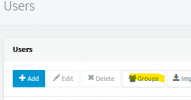
Groups are on the Users tab:
1688156397001.png
On the Group page you can add a group, or edit it to add/remove members.

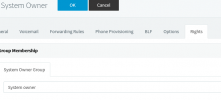
Edit the new extension and you will see on the Rights tab, a tab for each group the extension is part of:
1688156550309.png
 
Thanks for the feedback, but I still don't understand.
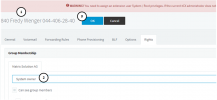
As I worte, I want to add the group "Systen owner" to my existing account, but it's not stored:
1688225424129.png
I edit my account ( 1 ) change "Group membership" from "User" to "System owner" ( 2 ) (so the group exists)
and press "OK" ( 3 )
(no error message is showed)

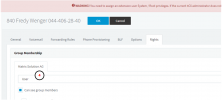
If I edit my account again:
1688225613956.png
the group membership is reset to "User" ( 4 ) (although I have pressed OK ( 3 )

So... what gets wrong here (or what do I wrong) ..?
Thanks for a further feedback.
 
I think you’re misusing the word “group” which may be causing confusion. In your image, System Owner is a role, and Matrix Solutions AG is the group name.

As to why it isn’t saving your edit, I do not know.
 
Sorry, but I don't understand you.
Should the problem (error message) be solved, if the "group membership" to "system owner" ( 2 ) would be stored or not?
 
Yes you need to assign the System Owner role to at least one extension.

If 3CX isn’t saving your change for some reason, does it work if you create a new extension?
 
  • Like
Reactions: FredyWenger
I will check this out (create a new extension).
In the meantime... thanks for your feedback.
 
Status
Not open for further replies.

Forum statistics

Threads
111,974
Messages
590,081
Members
164,899
Latest member
mazet