We need the ability to manually add/change the authentication ID and Password for phones like we did in version 18?

Thiek

Premier Customer
Joined
Dec 5, 2017
Messages
134
Reaction score
27
At our distribution centers we have analog phones in the warehouse, and IP phone in the offices. There are typically 100 to 200 analog phones at each center, these analog phones are not assigned to anyone, they are sort of like a courtesy phone used for paging to the overhead paging system, calling 911, maybe calling maintenance if someone has an equipment malfunction, etc. On v18, I would create an ext. and by default the phone type was “3CX app” which appears to no longer exist. I could then manually setup the ID and password, or create a spreadsheet for all 100 to 200 phones and import it. From here I would build those extensions to the Patton or Welltech gateways and simply copy the 3CX credentials (ID, password) so the device could then authenticate each port (ext) back to 3CX. In fact, this is also how I configure the Bogen paging system device so it can connect to 3CX allowing it to receive phone calls. How can I do this on version 20?

I see in the below post, only the password can be manually changed if the end user has an email address. This is not an option for my needs, analog phone do not have an email address. In fact it seems odd to assume everyone with a phone will have an email. We have many people assign to IP phones who do not have an email, they simply make/receive calls. https://www.3cx.com/community/threads/v20-how-to-setup-passwords-for-users.124744/
 
  • Like
Reactions: RCCradio
I think something is being confused: the login password of a 3CX user, for example, to log in to the 3CX web client, and the login data for a SIP device as a 3CX extension, as you need it.

The first can officially only be set using an email address. The second exist (and can be read) at any time from an extension that has already been created.

The following works: export an extension as usual, edit the export (individualize number, name, WebMeetingFriendlyName and vmpin), import the data and all the extensions will be created. Then make a backup and look under <Extension> for <AuthID>, <AuthPassword> and <Number>. These are the individual SIP login data of the extensions. When the extensions are imported, they are uniquely created. You can use these to equip your analog gateways.

As long as none of these users have to log in to the 3CX web client, these extensions do not need an individual email address or a password of this kind.
 
Last edited:
  • Like
Reactions: bitn2 and N_G
At our distribution centers we have analog phones in the warehouse, and IP phone in the offices. There are typically 100 to 200 analog phones at each center, these analog phones are not assigned to anyone, they are sort of like a courtesy phone used for paging to the overhead paging system, calling 911, maybe calling maintenance if someone has an equipment malfunction, etc. On v18, I would create an ext. and by default the phone type was “3CX app” which appears to no longer exist. I could then manually setup the ID and password, or create a spreadsheet for all 100 to 200 phones and import it. From here I would build those extensions to the Patton or Welltech gateways and simply copy the 3CX credentials (ID, password) so the device could then authenticate each port (ext) back to 3CX. In fact, this is also how I configure the Bogen paging system device so it can connect to 3CX allowing it to receive phone calls. How can I do this on version 20?

I see in the below post, only the password can be manually changed if the end user has an email address. This is not an option for my needs, analog phone do not have an email address. In fact it seems odd to assume everyone with a phone will have an email. We have many people assign to IP phones who do not have an email, they simply make/receive calls. https://www.3cx.com/community/threads/v20-how-to-setup-passwords-for-users.124744/
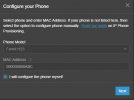
When you add a phone to the user you will be able to assign a generic phone

1728629998963.png

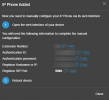
You will then be given the crednetials needed to connect the device

1728630067357.png

Once you close this screen You will be taken to the IP Phone page in the user. From here, if you wish you can change the AUTH ID of the device (as some older devices need the extension and AUTH ID to be the same).

However, the password CANNOT be redefined. This is always randomly defined, for security purposes. And before anyone asks, no this behaviour will not be changed.

One of the main methods of breaching a system is to guess passwords, and we reduce that risk factor by NOT allowing admins to dumb down the security.

In fact it seems odd to assume everyone with a phone will have an email.
When it is a user with only a phone, and no need for web client access then they DO NOT need an email address. However, if that user also needs the access to the web services then YES they will require a unique email address.

The authentication of the users is now linked to the email of the user for 2FA as well. This is the reasoning behind this.
 
And before anyone asks, no this behaviour will not be changed.
Haha! You anticipated that perfectly! :cool:
I love your response! :p

I think it’s a good idea that this is no longer editable. It will finally prevent issues where a client, not understanding the difference between a SIP username and password compared to the webclient’s username and password, ends up breaking the connection on all their devices.

But jokingly, to respond to your sentence… I would say:
What would you like for your birthday? If you’re nice and change the new logic, you’ll increase your chances of getting it!xD
 
First, I want to say thank you everyone for your quick responses. It’s truly a blessing when in a pinch and someone is there to help.

I first looked at what “fxbastler” suggested, however, I ran into questions. For example, I took x9041, an existing extension ported over from v18 to v20 that is configured on the Patton analog gateway and now I want to add one more analog phone to that device, x9042. I exported 9041 in 3CX but I do not see a column in the export file labeled WebMeetingFriendlyName or anything that closely resembles this. I was then a bit lost about the part, “then make a backup and look…” what do mean by make a backup?

Second, in response to “NicholasP’s” reply, I was wondering if this is what I need to do, add some sort of generic IP. I get the part about not making the password field editable but still having a hard time swallowing this (pun intended LOL) only because it sounds like I will need to manually do this for 100 plus phones and the faster/easier importing a .csv is not an option… correct? I have a future install with 166 phones. PS – port 9042 registered and works after following your notes.
 
then make a backup and look…” what do mean by make a backup?
import or create all needed new extensions, make a 3CX backup, unzip it and look in the xml
 

Forum statistics

Threads
111,954
Messages
589,923
Members
164,852
Latest member
priya