Web Conferencing Video Quality: 2. Latency

Status
Not open for further replies.

LeonidasG_3CX

Product Manager
Staff member
Joined
Nov 19, 2008
Messages
2,174
Reaction score
658
In part one of this series, we discussed meeting quality profiles, required bandwidth and the factors that affect it. Like we mentioned before, there are several factors that influence meeting quality, most of them are easily fixed. Whether it\'s new devices that are needed, a more powerful internet connection, or some simple configuration of your ...
Continue reading the Original Blog Post.
 
  • Like
Reactions: JohnS_3CX
Thanks for this interessing article. I checked my settings and found out that I can't see the server infos in my WebMeeting’s statistics. Maybe this is related to the following finding.
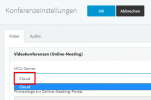
On the PBX settings under Conferencing I only can chose "Cloud" as MCU Server. How can I ensure to select a zone that is most applicable for me?

1617642773408.png

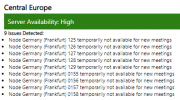
Video Quality is sometimes really bad, especially if you share your screen in a webmeeting it is hard to read a written word. As we are located in Central Europe I additionally wonder why so many MCUs are out of order:
1617643136883.png

Please advice
 
Hi,

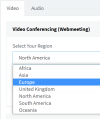
Starting from V18 (currently under development) you will have the choice to pick your zone from the conference settings in the management console. Here is a preview example of what it will most probably look like:

1617696518486.png

*At the moment on V16, this is controlled by the country assigned to your license key.

As for the MCUs listed "temporarily not available for new meetings" we are working on replacing them at the moment so this is a temporary situation which should be remedied.
 
  • Like
Reactions: VSC
@VSC

in v16 you can click on the gear icon and under Info the server location is shown to you.
For the stats in v16, click again on the gear icon, Network, Advanced
 
  • Like
Reactions: VSC
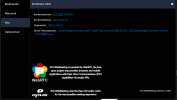
My license key is assigned to Germany, but I always get connected to webmeeting Servers in France or UK.
 
My license key is assigned to Germany, but I always get connected to webmeeting Servers in France or UK.
Could you open a WebMeeting and post a screenshot of the Server Information you see?
 

Attachments

  • Quickmeeting.png
    Quickmeeting.png
    45.2 KB · Views: 10
Thanks! Could you try restarting all the 3CX Services once, then check again from the WebMeeting information?
 
@MH_INDUS
We just made a very slight change, so please restart the services at any time from now on and see if you connect to a different server please.
 
@NickD_3CX
After restarting I now get connected to webmeeting servers in the correct country.
 
  • Like
Reactions: NickD_3CX
Status
Not open for further replies.

Forum statistics

Threads
111,973
Messages
590,078
Members
164,896
Latest member
sameage