Solved Web console allows login without password

Status
Not open for further replies.

Helmut72

Free User
Joined
Aug 24, 2017
Messages
30
Reaction score
2
Hello,

as the subject says, I can log in to the webconsole (https://3cx.mydomain:5001) without logging in as admin. I'm not asked for a user/pass at all. Why?

Thank you!
 
Hi @Helmut72 ,

That means your haven't logged out from your previous session and it hasn't expired yet. If you logout you will then be asked to login to access the dashboard.
 
The last time I was logged in was a few hoers ago. I shut down the PC also. How can I manually close the session, how can I check what account I'm logged in currently:
 
The last time I was logged in was a few hoers ago. I shut down the PC also. How can I manually close the session, how can I check what account I'm logged in currently:

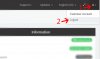
The easiest and recommended way to logout is via the logout link:

3cx_Logout.jpg


On the top right section there's the user account menu. It will show the Initials of the logged in user. For example A stands for Admin. If you were logged in with an extension under the name "Demo User" it would say DU.
 
Thank you. Admin was logged in without prompt. I logged out manually and now I'm asked for a login again. Still a bit concernend. :)
 
Thank you. Admin was logged in without prompt. I logged out manually and now I'm asked for a login again. Still a bit concernend. :)

You shouldn't be :) If you logout before you close the browser/computer there is no way you will be logged in as admin the next time you open the Management Console.

Alternatively you can use an incognito window which will automatically delete your cookies after you close it.
 
  • Like
Reactions: craigreilly
You shouldn't be :) If you logout before you close the browser/computer there is no way you will be logged in as admin the next time you open the Management Console.

Correct. But leaving a session valid for hours is still something the concerns me. I closed the browser yesterday without logging off and re-opened it more than 12h later again. No password prompt. Imagine this with your online banking session. :eek:
 
@Helmut72 It just uses cookies like any other online service. Set your browser to delete your cookies on close if you don't want to logout every time. Granted, it may not be a bad idea to allow users to set a timeout period from within 3CX, but you should post in the Ideas forum if you'd like to see that as a feature.
 
  • Like
Reactions: YiannisH_3CX
Status
Not open for further replies.

Forum statistics

Threads
111,873
Messages
589,501
Members
164,722
Latest member
Arnel