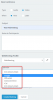
Web meeting invite - Ability to change the return path to the senders email address.

Status
Not open for further replies.

Chris_P

Forum User
Joined
Jul 29, 2019
Messages
19
Reaction score
0
Hi

Can someone help explain how we change the settings so that when the system sends an email invite to a web meeting the return path is the sender of the invite and not the VoIP Admins address?

Regards
Chris
 
Hi Chris

If the system is the sender then, the system shall remain the sender no matter who creates the meeting.

However, there are options:

1581432459494.png

If you choose one of those, then you will be the one sending the actual invite from your inbox
 
Thanks John that makes sense.
 
Hi John

Sorry one more question, if you select 3CX direct, the phone system will send a unique email to each of the participants. If you selected iCal as the option, and forwarded your calendar invite to the participants then all participants get the same login URL, which can then be forwarded to anyone. This for our organisation posses a security risk as we are in the health industry and confidentially is critical.We are currently running onsite email server using Microsoft Exchange Server 2010. Have you got any suggestions to over come this problem?

Regards Chris
 
I see what you mean, however I'm not sure if this would be solved by personalized URLs.

What I mean is, whether I send you a personalized URL or a generalized URL, you can still share it with 3rd parties.
 
Hi John, that is true, however with the personal URL, once the participant logs in that link becomes useless for anyone else to use at the same time during the conference.Agree its not fully fool proof but is a bit more secure.

Thanks anyway for your help on this. I'm not sure there a perfect solution at the moment, but maybe this can be address with future 3CX software updates.

Regards
Chris
 
Personalized URL's already contain participant's name, so that's an advantage.

And 3cx could easily use the organizer's mail address as sender, as 3cx already knows it, and most mailservers can be configured to allow "modified" sender addresses within the same domain.
 
Hello to all

Why is it only possible to download the iCal invitation by using the webclient and not directly with the 3cx softphone? Why can we only download the iCal for the profile webmeeting and not for the webinar one?

Thanks for the feedback

Will there soon be a new windows client or is only the webclient getting updates, we need a better softphoneclient, please.

Thanks Fabio
 
Hello to all

Why is it only possible to download the iCal invitation by using the webclient and not directly with the 3cx softphone? Why can we only download the iCal for the profile webmeeting and not for the webinar one?

Thanks for the feedback

Will there soon be a new windows client or is only the webclient getting updates, we need a better softphoneclient, please.

Thanks Fabio

@JohnS_3CX

Can you please give me an imput on this one? We have some customers that need all the functions in the softphone, but I see here the softphone is not getting any updates in the last years... It's only okay for small resolution more the HD makes the softphone pretty small. Some functions are missing...

What is 3cx planning?

I like the softphone because it's bringing some good options as ring on another device, autostart, take call by buttons on the headset and so on...don't need no login and its not in a browser tab somewhere...

Hope you can give me some news, thanks
 
Hi @Fabio Colbrelli

The "Webinar" profile does not download an iCal

The softphone is being developed less and the focus will be on the Webclient, we have announced this on various occasions and in forum posts. The features you mention are already there:

- Select which device to use (or stay in sofclient mode)
- Answer via headset button integration
- Autostart (when using our Chrome plugin - it always runs in the background)
- Not in a browser tab
- No login needed after the first time
- Click to Call included

I suggest to test the webclient with the chrome plugin and see how well it works for you, and rest assured we will continue to develop it further and add more features while also integrating it with the webmeeting and webinars
 
Hi @Fabio Colbrelli

The "Webinar" profile does not download an iCal

The softphone is being developed less and the focus will be on the Webclient, we have announced this on various occasions and in forum posts. The features you mention are already there:

- Select which device to use (or stay in sofclient mode)
- Answer via headset button integration
- Autostart (when using our Chrome plugin - it always runs in the background)
- Not in a browser tab
- No login needed after the first time
- Click to Call included

I suggest to test the webclient with the chrome plugin and see how well it works for you, and rest assured we will continue to develop it further and add more features while also integrating it with the webmeeting and webinars

Hello @JohnS_3CX

Thanks for the great feedback, I just did all updates and I'm using now the webclient with the plugin, it's working great, nice to hear from 3cx that were going forward...Some small imputs from my side...

The small 3cx Plugin Phone client doesn't show missed Queue Calls and the Mobileapp has the exact same problem => Will this be solved?

When you choose different audio device for ringing and calls => everything is working great => when you start a call the ringing "beep" "beep" is on the speakt set for ringing instead of the headset => as soon the call gets picked up I hear everything on the headset..

Thank for the feedback
Greetings
Fabio
 
Hi Fabio,

Stay tuned for our upcoming Update 5 which will introduce and updated Chrome Plugin and further improvements.
 
Status
Not open for further replies.

Forum statistics

Threads
111,973
Messages
590,078
Members
164,896
Latest member
sameage