Web Meeting quality

Status
Not open for further replies.

Jeff Koertzen

Premier Customer
Joined
Jan 29, 2019
Messages
38
Reaction score
7
We are having severe issues with our web meeting. (Similar to prior/unresolved closed thread https://www.3cx.com/community/threads/2-questions-default-quality-bad-connection.67171/).

I installed 3CX on our servers almost a year ago, and I've deployed to a handful of staff, but I haven't been able to go live because of the problems we continue to encounter. It is very embarrassing to have to keep addressing the issue with senior staff and leadership explaining why I haven't gone live with it yet.

We have theoretical 200 Mbps fiber speeds in the office. I have a lot of unused available bandwidth. (I had actually upgraded anticipating moving away from our dedicated PRI to use the bandwidth with 3CX.)

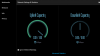
From the prior thread, it got me looking into the network settings for the meetings and then to the statistics. Can you explain why if speedtest shows current available bandwidth of 128.22 Mbps down and 153.65 Mbps up I'm only getting 0 Mbps down and 1 Mbps up on 3CX? And that is when plugged in. When I go wireless, my speedtest drops to around 60Mbps, but the 3CX appears to remain throttled.

SpeedTest:
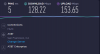
CRI-Network-Speeds.png

3CX WebMeeting
3CX-Network-Capacity.png

Thank you,
Jeff Koertzen
IT Manager
CRI of San Francisco
 
1Mbit is the default bitrate for all meetings and is configurable in the Webclient during meeting creation via the settings cogwheel. The bitrate can also be changed on the fly during the meeting via 'Multimedia' tab just above the 'Network' tab in the screenshot you provided.

For the moment the maximum allowable bitrate during meeting creation is 6Mbits. Changing it on the fly from inside the meeting is limited to 4Mbits. We are working on updating this part, and an update for it will be available soon.
 
We are having the same issue constant pop ups saying we have .35 mbps. We have a 500/500 fiber connection. The computer is running at 185 mpbs up and down. ?
 
Hello!

With our new Google CDN there are no Routing-Problems? i work from austria (Mozart) and i get mcu server from australia (kangaroo) ?

Serverinformationen:Australia (Sydney) #3 - as014-syd.3cx.net (13.237.217.167) - AU Australia Sydney - Version: 10.5.10.26185/Linux
 
Hello
same problem here,
my users work in France , quite all our meetings start on the taiwan/australia MCU !
checked on status.3CX.net , they are the poor RTT MCUs..

add: we've stopped to use 3CX webmeeting as it's unusable for our trainings today.

thanks
 
Last edited:
I launched my personal meeting several time. From my French ISP :
first time : Australia AS015 ,
second time : Taiwan AS001
just now I had Brazil sao paulo US006
and India Mumbai AS002

the new load balancing clearly does not work for us and the webmeeting is unusable.
BR
Stéphane
 
The Google CDN only delivers the client to your browser.

It does not decide which MCU you will connect to.
 
I trust you
so where is the problem ? can I help on the troubleshooting ?
 
Hi Stephane,

As you can see on our status updates, today we are making more optimizations to accomodate for the increased load of these days, by adding more servers, and deprecating older ones hence you may notice some effects on new and ongoing meetings.

I don't think you will need to do any troubleshooting on your end.

https://status.3cx.net/
 
a problem that i have discovered is that if you put on the router lan interface the MTU at 1320 i can speak with participants but i cannot see myself or the others on the cam. I have solved setting the MTU at 1500 but unfortunately this break my VPN. IS there a way to permit to the webmeeting to be more flexible in the next future release?
 
Thank you John,
I'm following https://status.3cx.net/ as soon as I can, effectively the MCUs move very frequently
Could we know the ending maintenance time in order to communicate with my end-users/headquarter on a recovery service at 100% ?
BR
Stéphane
 
Not sure if it can be known at the moment, changes may continue to be necessary depending on the traffic load increase so stay tuned!
 
I asked some end-users to try again the 3CX webmeeting and the first feed-back seems ok.
one thing : we saw on the status webpage : #2 All meetings will start with your video disabled by default. that is not the case all the time.
 
Thank you for the feedback, we appreciate everyone's patience during these times and will keep scaling the system as needed to cover the demand.
 
Status
Not open for further replies.

Forum statistics

Threads
111,973
Messages
590,077
Members
164,896
Latest member
sameage