Solved Web meeting screen sharing

Status
Not open for further replies.

Ronin

Joined
Jan 21, 2019
Messages
176
Reaction score
20
Hello,

We had a meeting today where one participant could not see the "screen sharing" of other participants.
Is this a common bug?
We have left the web meeting open and I could also provide with logs in Verbose mode.
 
Dear Ronin,

are we talking v16 or v18 of 3CX?
In both cases, no it is not a common bug we are aware of.
 
Hello @StefanW ,

We had the latest 18.0.230 version directly installed because of the web meeting problems (disconnection/reconnection issues).
 
Last edited:
okay, I am just asking as they use a partly different web app.
How predictable is this replicable?
Is it always the same user?

As we use the same platform for our webinars and we have 100+ customers following your streams, we can exclude the general issue.
 
It's not really repeatable. In my tests, screen sharing works.
The problem was reported 3 times by a different user.
2x on the 18.0.226 version and 1x in the 18.0.230 version.
 
In the 18.0.226 the problem was:
If a user (A) had the dialogue open to share the screen and at the same time, another participant (B) wanted to share his screen ---> the session would freeze completely for the user (A) and he would have to leave the meeting. The user (B) could then share his screen.
 
Hi there,

We've found and fixed this issue in our internal buld during our tests. A new version will be released some time this week with this fixed.
 
Hello @LeonidasG ,

After the update to 18.0.234 we have the following problem:
A shared screen does not appear in full screen mode, but in the camera window (top left) of the participant who shares his screen.
Reconnecting to the web meeting or restarting the screen share does not fix the problem.
Are you able to replicate this issue?
 
  • Like
Reactions: Ronin
  • Like
Reactions: VasilisV_3CX
No problem @Ronin. When the issue has been resolved, we'll update the threads.
 
Good evening everyone,

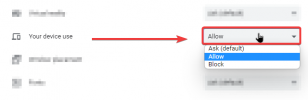
I had a report of this issue in my enviorment and I was able to find a possible fix. Please check if the "your device use" permission setting is set to allow. I noticed this was newly added to google chrome and it resolved the issue for myself when I abjusted the setting from ask to allow.

chrome_tH3Eri6sZd.png
 
Status
Not open for further replies.

Forum statistics

Threads
111,973
Messages
590,076
Members
164,895
Latest member
jasonkkrause