Web meeting Synchronization - Network Error

Status
Not open for further replies.

Vineeth Mohan

Free User
Joined
May 25, 2021
Messages
104
Reaction score
4
Hi,

Everything was fine till yesterday. I see an error "Your PBX cannot connect to https://******-**.3cx.net. Please check your network settings".
All updates are installed and running version 16
Appreciate your help at the earliest.

Thanks in advance

Vineeth Mohan
 
Hi @Vineeth Mohan,

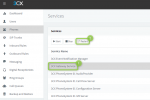
Try and restart the Gateway Service from the Dashboard >> Services:

1648795964018.png

Check if that works. If not:

In your 3CX Management Console >> Settings >> Network >> Set the "External IP Configuration" to Dynamic.

Restart your services from the Dashboard.

Give it a few minutes (15 - 30 minutes) and check again.

If this doesn't work let me know.
 
Hi @Vineeth Mohan,

Try and restart the Gateway Service from the Dashboard >> Services:

View attachment 29186

Check if that works. If not:

In your 3CX Management Console >> Settings >> Network >> Set the "External IP Configuration" to Dynamic.

Restart your services from the Dashboard.

Give it a few minutes (15 - 30 minutes) and check again.

If this doesn't work let me know.
Hi @VasilisV_3CX ,

Thanks for the reply.
But I couldn't find 3cx gateway services in the services section.
I changed from static to dynamic IP in the external IP section. Actually, I am not sure whether this is going to work as the external IP which I have is a static one.
 
Hi @VasilisV_3CX ,

Thanks for the reply.
But I couldn't find 3cx gateway services in the services section.
I changed from static to dynamic IP in the external IP section. Actually, I am not sure whether this is going to work as the external IP which I have is a static one.

@VasilisV_3CX

Will this affect the tele calls or only web calls?
 
Hi @Vineeth Mohan,

It'll be the Web Meetings only for now, but remember:

"November 30th 2022 brings the official date that version 16 support will be withdrawn. After this date, security patches and reactivations of installs will not be possible so customers must have upgraded to V18."

So I'd suggest mentally preparing everyone for the upgrade to v18!
 
@VasilisV_3CX

Will this affect the tele calls or only web calls?
@VasilisV_3CX

I run 3cx on windows. To upgrade to V18. I need to take a backup of the current 3cx configurations. Uninstall V16 and install a fresh copy of V18. Will I get the entire configuration as the same including my call logs & recordings as now?
 
Hi @Vineeth,

Yes the process is as you've said:
  1. Take a full backup
  2. Uninstall the Windows v16 PBX
  3. Install the v18 PBX
  4. Use your backup during installation
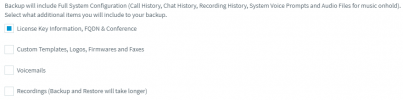
Everything the backup includes will be installed, as mentioned here in the top text:

1648799989706.png
 
Hi team

Full Backup contains nearly 600GB as we have huge amount of Recording files i.e nearly 550GB

What you advice on this scenario, How can we upgrade v18 with our Full Backup Configuration?

Which will take huge time to restore, How can we minimize this downtime on this scenario?

Thanks
 
Status
Not open for further replies.

Forum statistics

Threads
111,974
Messages
590,083
Members
164,900
Latest member
Silent_Guru