- Joined
- Mar 5, 2022
- Messages
- 96
- Reaction score
- 32
Hello,
I have been having issues with the webcam on 3CX web page Chrome Version 103.0.5060.114 (Official Build) (64-bit).
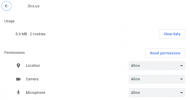
My camera is allowed to be used with 3CX in Chrome:
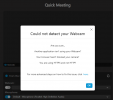
If I try to just create an instant meeting from my extension on the web page (as well as desktop and web app), in "Quick Meeting", here is what happens:
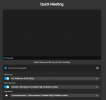
When I do a video call to that extension, the webcam works:
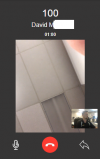
The webcam is looking at me, in the lower hand right corner
Any advice on how to fix this please?
Thanks a lot for your help.
I have been having issues with the webcam on 3CX web page Chrome Version 103.0.5060.114 (Official Build) (64-bit).
My camera is allowed to be used with 3CX in Chrome:
If I try to just create an instant meeting from my extension on the web page (as well as desktop and web app), in "Quick Meeting", here is what happens:
When I do a video call to that extension, the webcam works:
The webcam is looking at me, in the lower hand right corner
Any advice on how to fix this please?
Thanks a lot for your help.