Webcam problem with 3CX Quick Meetings

Status
Not open for further replies.

DavidM84

Free User
Joined
Mar 5, 2022
Messages
96
Reaction score
32
Hello,

I have been having issues with the webcam on 3CX web page Chrome Version 103.0.5060.114 (Official Build) (64-bit).
My camera is allowed to be used with 3CX in Chrome:
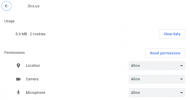
meeting0.png

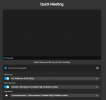
If I try to just create an instant meeting from my extension on the web page (as well as desktop and web app), in "Quick Meeting", here is what happens:
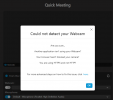
meeting1.png
meeting2.png

When I do a video call to that extension, the webcam works:
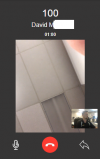
meeting3.png
The webcam is looking at me, in the lower hand right corner :)


Any advice on how to fix this please?

Thanks a lot for your help.
 
Can you please check if you have the 3CX Client open in your browser & the 3CX Web App installed and opened on the bottom right in your taskbar?

If these 2 are open simultaneously, there's the possibility of 1 locking the camera making it unavailable for the other app to use it. The best way to verify this is to close the Installed 3CX App on your PC (May be hidden in the taskbar) and try again.

Additionally, other video camera software that may be open at the same time can also lock your camera.


This would be the first place i'd look. After that, i'd take a screenshot of the error that appears in your Browser's Debug Console. You can access this by pressing F12 while you're inside your browser and on the 3CX Meeting page. If your issue is not related to your camera being used by another application, please attach a screenshot of your browser inside the F12 debug console.
 
  • Like
Reactions: DavidM84
I have restarted my computer and removed chrome and reinstalled it.

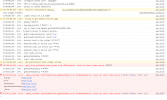
Still the same error message in the browser's log:
3cxwebmeetingwebcamnotfound.png
 
I have restarted my computer and removed chrome and reinstalled it.

Still the same error message in the browser's log:
View attachment 30923
Do you have anything like OBS, Zoom or Teams running at the same time? Anything that could be reserving the webcam?

Also, if you just open Camera app, does it work?
 
I am using windows 8.1 BTW.

I have no app runnning using my webcam. I don't have any other app like Zoom etc...
And the native camera app works fine.
 
If you try using Edge or Firefox, does the cam work?
 
I have restarted my computer and removed chrome and reinstalled it.

Still the same error message in the browser's log:
View attachment 30923

This immediately tells me that either Chrome cannot access your camera for any reason or that your camera is locked by something else.

Can you try going to your "Chrome Settings > Privacy and security > Site Settings > Permissions > Camera" and set this to "Sites can ask to use your camera.

Give this a check. Additionally, do you have any antiviruses on your computer that are set to a super secure mode? If so, these antiviruses may be cleaning up the VideoConferencing cache in your browser and causing issues like this.

If Firefox works but Chrome doesn't, sounds like some kind of configuration/misconfiguration with Chrome.
 
  • Like
Reactions: Evolute IT
Status
Not open for further replies.

Forum statistics

Threads
111,973
Messages
590,077
Members
164,896
Latest member
sameage