Solved Webclient 18.0Update1 Headset issues Mac and Linux

Status
Not open for further replies.

Martin_Thomas_HPA

Premier Customer
Advanced Certified
Joined
Aug 27, 2019
Messages
83
Reaction score
16
Hello,
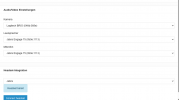
since the last Update I have a issue in the Webclient on Mac and Linux Clients. In Firefox I can not select an Output device I can only use the default. In chrome I can select my Headset but if I make a call it shows Microphone not fond. If I press ok Headset micro works but the Output comes out of the Default Audio device. I have testet Jabra and Plantronics USB headsets. Both have the same issue.
Last week before the update anything wars fine....
Teams Client have no problems, there the headsets work perfect....

What happens with the Webclient???? :confused:
 

Attachments

  • Bildschirmfoto 2021-10-18 um 12.26.39.png
    Bildschirmfoto 2021-10-18 um 12.26.39.png
    38.2 KB · Views: 9
Hi @Martin_Thomas_HPA,

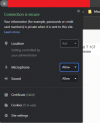
Let's start with just Chrome and see if we can get that working. When you navigate to the WebClient, do you "Allow" your microphone / camera?

Untitled2.png

If you don't see the option, it's likely that you've not tried to make a call OR the device is not detected.
 
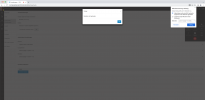
Hello and Thank you for your quick reply. Nothing have changed since the update on the client side. Anything is allowed. I Have deleted all browser Settings an have tried a different computer. everywhere the same issue und Mac an Linux
 

Attachments

  • Bildschirmfoto 2021-10-18 um 12.59.38.png
    Bildschirmfoto 2021-10-18 um 12.59.38.png
    198.4 KB · Views: 12
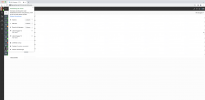
2nd Screenshot
 

Attachments

  • Bildschirmfoto 2021-10-18 um 13.03.13.png
    Bildschirmfoto 2021-10-18 um 13.03.13.png
    201.2 KB · Views: 5
Ok i have tried it. No change. Same problem after clear......
 
Hi @Martin_Thomas_HPA,

Did you close the browser down fully (end it's processes) and start it up again?
 
yes, I have tried with a computer reboot to
 
Hi @Martin_Thomas_HPA,

Can you provide the exact version of Chrome you're running on the Mac?
 
In Firefox I can not select an Output device I can only use the default.

Side Remark:
On FF this is generally not possible, the same restriction we have on 3CX Video Conference for FF users. Unfortunately, nothing on this we can do while using this browser.
 
  • Like
Reactions: Evolute IT
Version 94.0.4606.81 (Offizieller Build) (arm64)
 
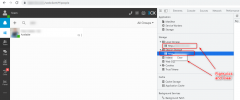
With Default setting no issues
with direct selection errors...
 

Attachments

  • Bildschirmfoto 2021-10-20 um 16.37.04.png
    Bildschirmfoto 2021-10-20 um 16.37.04.png
    129 KB · Views: 11
  • Bildschirmfoto 2021-10-20 um 16.37.18.png
    Bildschirmfoto 2021-10-20 um 16.37.18.png
    128.1 KB · Views: 11
@Martin_Thomas_HPA

As per our PM conversation, thank you for confirming this.

As also mentioned, since we've been able to reproduce this, we'll be looking into the matter and will update this thread accordingly.
 
Any update on this, Causing me greif.
 
Any update on this, Causing me greif.
This is still under investigation but, as mentioned previously, we'll update this thread once we have news.

In the meantime, do bear in mind that you should be able to temporarily work around this by setting the headset as the OS's primary audio device and then selecting the "default" device in the webclient's audio settings.

This has been confirmed on MacOS but would most probably yield the same results on Linux as well.
 
3cx Support and our Service Partner Aconitas have tested this morning on my Mac. Thank you to 3cx that you have accepted my Bug Report. I think the Mac an Linux users are happy about an Bugfix as soon as posible.
 
  • Like
Reactions: ChrisC_3CX
To update this thread, please be informed that this issue has been identified and will be addressed in 3CX v18 Update 2. There still is no ETA so please keep an eye out for it in our Product Information and Releases section.

Will be marking this as closed for now.
 
Status
Not open for further replies.

Forum statistics

Threads
112,025
Messages
590,368
Members
164,978
Latest member
FringeIT-Eric