Webclient and new V18 Desktop App doesn't allow Q login and logut

Status
Not open for further replies.

Steve_W

Silver Partner
Basic Certified
Joined
Mar 20, 2020
Messages
9
Reaction score
0
We recently upgraded to v18 but facing some challenges with agent log-in and log-out. Can click on the "Q" button in the web client nor in the desktop app (which now looks just like the web client interface).

Anybody else facing this issue?
 
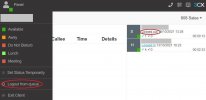
The Q login/logout is in the user menu, when you click the avatar.

As for explicit, it is still in the same place in Panel > select the queue.
 
  • Like
Reactions: VasilisV_3CX
  • Like
Reactions: Evolute IT
Thanks for everyone's help.

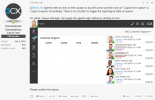
For agent "S", global login/logout from queue appears to work (but can't verify status as the panel still shows that agent 1 is not logged in). However, the queue specific login/logout doesn't do anything when clicked on - we tried this in the v18 app, chrome and firefox.

For agent "H" clicking on both the global queue login/logout and the queue specific login/logout works.

Any thoughts on what might be causing the problem for agent "S"?

3cxqueue.JPG
 
Hi @Steve_W,

Is this happening on only the S extension or on many?
 
Thanks for everyone's help.

For agent "S", global login/logout from queue appears to work (but can't verify status as the panel still shows that agent 1 is not logged in). However, the queue specific login/logout doesn't do anything when clicked on - we tried this in the v18 app, chrome and firefox.

For agent "H" clicking on both the global queue login/logout and the queue specific login/logout works.

Any thoughts on what might be causing the problem for agent "S"?

View attachment 25106
Hi Steve_W,

We are seeing exactly the same behaviour in the latest V18 updates across all systems we have upgraded, when you login in an agent in the 'Panel>Queue' it doesn't get reflected in the status of the agent in the Status drop down top left of the webclient. We also noticed there's no colour change of the 'Q' icons anymore...
 
Hi Steve_W,

We are seeing exactly the same behaviour in the latest V18 updates across all systems we have upgraded, when you login in an agent in the 'Panel>Queue' it doesn't get reflected in the status of the agent in the Status drop down top left of the webclient. We also noticed there's no colour change of the 'Q' icons anymore...
Could that be because the user is being logged out from ONE queue explicitly? This will not log them out globally.
 
Could that be because the user is being logged out from ONE queue explicitly? This will not log them out globally.
HI Frederick,

I've tried it on systems with only 1 queue, and systems with multiple, it doesn't update in either scenario... but I'm guessing you are right that's it is something to do with explicit log out rather than logging out of a single queue. That being said in the case where there is only one queue on the system, You would think it should update ...
 
HI Frederick,

I've tried it on systems with only 1 queue, and systems with multiple, it doesn't update in either scenario... but I'm guessing you are right that's it is something to do with explicit log out rather than logging out of a single queue. That being said in the case where there is only one queue on the system, You would think it should update ...
Not even unfortunately. Explicit and global are really separate even tho there's one queue only.

The only way for global login/logout is through the user menu, Q button.
 
Not even unfortunately. Explicit and global are really separate even tho there's one queue only.

The only way for global login/logout is through the user menu, Q button.
Good to know, I'll have to try and figure out a way to explain this to clients so it doesn't look like a system flaw...
 
Hi,

same issue here. The Queue Manager cannot logout and login agents to the queue. In version 16 it was possible.So is this a bug? If not what is the correct way to reach this?

regards
 
Status
Not open for further replies.

Forum statistics

Threads
112,349
Messages
592,027
Members
165,513
Latest member
megalmazan