Webclient call report play files

Status
Not open for further replies.

Tedo1978

Premier Customer
Joined
Mar 15, 2023
Messages
27
Reaction score
0
Hello,
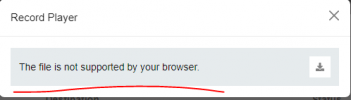
When I try (from the web client) to run a recording from the call reports it throws the following message.

Can you tell me why?
 

Attachments

  • Captur1221e.PNG
    Captur1221e.PNG
    4.6 KB · Views: 15
What browser are you using?
 
Years ago when I first wrote our 3CX Recording Manager tool, I discovered that some browsers could play .mp3 files and others could play .wav files (3CX recordings are .wav files), and still others could play both.

I was just asking my staff yesterday to see if that limitation is still true. I would have thought, after all these years, that every browser could play both, but I have not received the results of testing yet. Years ago 3CX saved recordings as .mp3 files, but there was some concern the the patent holder might start charging royalties for the .mp3 format and 3CX decided to switch to .wav.

In our application, when someone clicks on a recording, we make a copy of the wav file, convert it to mp3, and then present both the .wav file and .mp3 file to the browser and let the browser choose which version to play. That solved the problem for us. I do not know what 3CX does.

In version 18 you have the option to compress recordings (that feature has been removed from V20). That is an even less supported version of the .wav format. Frankly, I don't know whether any of this plays into your issue. But perhaps your recording was saved in a compressed format by 3CX and the browser is having trouble with the compressed audio file? Perhaps others can offer additional insight.
 
Last edited:
Years ago when I first wrote our 3CX Recording Manager tool, I discovered that some browsers could play .mp3 files and others could play .wav files (3CX recordings are .wav files), and still others could play both.

I was just asking my staff yesterday to see if that limitation is still true. I would have thought, after all these years, that every browser could play both, but I have not received the results of testing yet. Years ago 3CX saved recordings as .mp3 files, but there was some concern the the patent holder might start charging royalties for the .mp3 format and 3CX decided to switch to .wav.

In our application, when someone clicks on a recording, we make a copy of the wav file, convert it to mp3, and then present both the .wav file and .mp3 file to the browser and let the browser choose which version to play. That solved the problem for us. I do not know what 3CX does.

In version 18 you have the option to compress recordings (that feature has been removed from V20). That is an even less supported version of the .wav format. Frankly, I don't know whether any of this plays into your issue. But perhaps your recording was saved in a compressed format by 3CX and the browser is having trouble with the compressed audio file? Perhaps others can offer additional insight.
Thank you for your reply,

Yes, I compress files and save them in ADPCM format, which significantly saves space, space in the data storage. If it will no longer exist in version 20, it turns out that I will need a separate data store to store these records.
 
Status
Not open for further replies.