Webclient Mac cannot edit audio & app is forbidden

Status
Not open for further replies.

orange2

Bronze Partner
Basic Certified
Joined
May 16, 2014
Messages
152
Reaction score
10
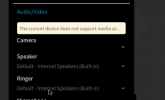
No audio; error in client as attached saying device does not support media settings (using built in Mac audio). Fell back to using the Mac app, but top right that shows forbidden.
I've uninstalled the extension and reinstalled. Chrome is on .latest

Anyone any idea where to go next?
Thanks
 

Attachments

  • Screenshot 2021-05-04 at 13.41.29.png
    Screenshot 2021-05-04 at 13.41.29.png
    25.9 KB · Views: 9
Hi @orange2,

It looks greyed out due to not having other devices plugged in which can provide audio/video functionality.

Do you have a headset you could plug in to test?
 
Hi @orange2,

It looks greyed out due to not having other devices plugged in which can provide audio/video functionality.

Do you have a headset you could plug in to test?
I don't think they have one. But it's a Mabook Air with built-in audio. I just need the built-in to work! Any guesses?
 
The audio problem exists only on the 3CX app and not on any other application right?

I would try and dial *777 from the extension and check if they can hear themselves on the echo test.

If not, check the Windows Volume Mixer to ensure the browser is not muted. If it is not muted, try and change the browser and test again. Try it on Firefox.
 
It's a Mac (clue in subject line!) but I will try the other stuff; thanks
 
Sorry that was a silly mistake. Replace Windows with macOS volume Mixer and all is well.

Again, does he audio problem exists only on the 3CX app and not on any other application? i.e Can you play youtube videos for example, and hear them?

When you make a call, can the other side hear you but you cannot hear them, or is it both parties can't hear each other?
 
Other apps are fine with built-in audio, and echo test works. No clue where to go here!

Why does her 3cx extension forbid audio device editing? And I assume that her 3cx app being forbidden has something to do with it?
 
When you say the echo test, do you mean the *777?
 
If the *777 test worked, that means that 2 way audio works. This leads me to believe it may well be something on the other side.
 
Such as? The user is an idiot, but hasn't (and cannot) changed anything at the server end. And there have been no crashes etc, with all other users being fine
 
Hi @orange2,

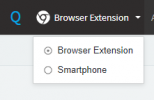
Some other things to check. Have you made sure you don't have the deskphone preselected before checking the Browser Extension?

1620372519186.png

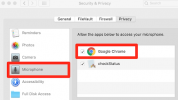
Have you also ensured that on the Mac, that Google is given permission to use the microphone?

2021-05-07.png
 
Hi @orange2,

It's best to also investigate the other side of the call. If *777 is working, it's telling you that this extension is most likely not the problem.
 
@orange2
Since you said the *777 is working OK and you have audio both ways, I would suggest to check in Management Console extension settings if "PBX Delivers Audio" option is enabled. If not, enable it and try again and see if it solves the problem.
 
Status
Not open for further replies.

Forum statistics

Threads
112,349
Messages
592,027
Members
165,512
Latest member
gmacinit