Webclient Missing

Status
Not open for further replies.

SouthwestAV

Bronze Partner
Joined
Mar 9, 2016
Messages
4
Reaction score
1
Following an otherwise successful upgrade to v18 (windows), the webclient is now missing. 404 error on the page - just nothing there. Management console works as expected without issue. The system is also showing an update (installed = 18.0.2.307; update = 18.0.2.314) available. This update fails with the only messaging being "3cx Failed to Update" with an ID of 10010. No email is received upon failure (emails do work for other events such as backups without trouble). I have physically rebooted the machine and tried the update a few times - no change. Any ideas?
 
Hi @SouthwestAV,

So following the successful upgrade, you can log in to the management console, navigate to an extension and then click the link for the WebClient under Web Authentication and you get a 404 error?

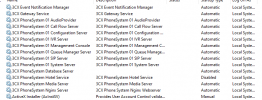
If you check the services in the Management Console, are all services up and running?

In Settings >> Email Notifications, is your email address the email address for all global notifications?
 
I have same issue also when I select auto update I receive same erro and 3CX console was not updated from
18.0.2.30718.0.2.314

Thank you
 
Hi @ravny,

Do did you receive an email stating why it failed the update?
 
HI,

no I didn t receive any email jut one since yestarday when I done full backup. At the moment Im looking in the logs if there is any more info.

Thank you
 
And strange is that there is in log "mNotifyFailedUpdated=False"


2022/01/13 04:05:38.178|11448|0017|Trac|VMMonitor: VoiceMailInfo is loaded: VoiceMailInfo for vmail_000_001_20191213093148:
mValid=True, mChanged=True, mUpdated=True, mWavExists=True, mRescan=False
mHeard=False, mNotificationSent=True, mRemoved=False, mNotifyFailed=False, mNotifyFailedUpdated=False
 
Hi @ravny,

Is your email address the email address in Settings >> Email >> Notifications? You normally should receive a failure to update email shortly after.
 
Yes my mail is entered and also I receive email when full backup is done. So SMTP is working

Your SMTP Test was successful! Your 3CX system can now send emails.
 
Hi @ravny,

In your Management Console, if you go to the Dashboard, what version is showing there?

Can you advise me more on your setup? Can you provide the following info?
 
  • 3CX Version, e.g. Annual 18.0.2.307 Type Subscription, Edition Professional, Version 18 Update 2, Sim Calls 8, Video Conferencing Seats 100
  • Server OS, Microsoft Windows 10.0.19044
  • Is the 3CX Server Hosted and where? On-premises
  • IP Phone Make/Model/Firmware version, Cisco 504G and Softphone
  • Provisioning Method: STUN ?
  • Trunk Provider or VoIP Gateway Make/Model, T2 local VoIP provider
  • Has the Firewall Checker passed: YES ?
  • Are custom Phone Templates being used: NO?
 
Last edited:
Hi @ravny,

On your server OS, is it running more than just 3CX (are there 3rd party applications running?)

Are you able to reach activation.3cx.com, try a tracert to activation.3cx.com, and if you can reach it - try the update again, if it fails, open all ports to activation.3cx.com as a test to see if perhaps that is causing the issue and try again.
 
Hi,

tracert

1 <1 ms <1 ms <1 ms firewall.xxxxx.local [192.168.1.1]
2 1 ms 2 ms 2 ms 84.255.208.206
3 2 ms 2 ms 1 ms 84-255-250-88.core.t-2.net [84.255.250.88]
4 1 ms 1 ms 1 ms 84-255-211-77.core.t-2.net [84.255.211.77]
5 31 ms 31 ms 33 ms google.telecity5.nl-ix.net [193.239.117.141]
6 32 ms 33 ms 32 ms 108.170.241.161
7 33 ms 32 ms 32 ms 108.170.241.173
8 33 ms * 33 ms 216.239.41.49
9 31 ms * 32 ms 209.85.142.97
10 32 ms 31 ms 31 ms 209.85.242.78
11 31 ms 31 ms 31 ms 108.170.255.129
12 31 ms 31 ms 32 ms 209.85.253.44
13 * * * Request timed out.
14 * * * Request timed out.
15 * * * Request timed out.
16 * * * Request timed out.
17 * * * Request timed out.
18 * * * Request timed out.
19 32 ms 32 ms 32 ms 148.209.242.35.bc.googleusercontent.com [35.242.209.148]

Thank you
 
Hi @SouthwestAV,

So following the successful upgrade, you can log in to the management console, navigate to an extension and then click the link for the WebClient under Web Authentication and you get a 404 error?

If you check the services in the Management Console, are all services up and running?

In Settings >> Email Notifications, is your email address the email address for all global notifications?
My apologies for going AWOL on the thread - had some bigger fires to deal with.

Your comments are correct - all services are running, email is correct, and like ravny, I receive my backup success emails without issue, but nothing on the update failure.

Tracert to activation.3cx.com shows does complete to the same address ravny lists as well.
 
  • Like
Reactions: ravny
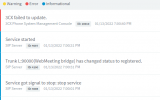
NO I just try once more with the update and in minute or two all services are stopped and than started. Than I login into 3CX and not updated and also NO email if update was successful of failed. Only on staus page message failed to update.


1642096913979.png

1642097131171.png
 
Hi @ravny and @SouthwestAV,

That is rather strange! I would suggest contacting your 3CX Partner to further investigate at this point.

Alternatively you can take a backup of your system, download it and reinstall the system using the backup.
 
Yes true but this is not solution for updates. Last time I also needs to do the full backup and than install 3CX and restore configuration from backup.

:(
 
Hi @ravny,

I've got a bunch of PBXs updating regularly and I've not had an issue yet. You can contact Support for assistance as it may well be an OS issue.

Another thing you may want to try to correct the problem entirely is backup the PBX, move the backup off of the machine, format the OS, reinstall. If the OS is clean there shouldn't be any issue with the PBX updating.
 
Status
Not open for further replies.

Forum statistics

Threads
112,349
Messages
592,027
Members
165,514
Latest member
megalmazan