Webmeeting audio

Status
Not open for further replies.

beurle

Customer
Joined
Jun 10, 2019
Messages
36
Reaction score
4
We primarily use deskphones. On meeting setup, we have to disable the computer audio to stop feedback loops. Is there a way to default computer audio to off if we have selected the deskphone?
 
Hi,

If you are creating an audio only conference and joining in with your phone, I was wondering why are you also logging in using the computer. Please describe a typical meeting so we can better understand.
 
Hi

I could be in a audio conference and then from the webclient start a video conference eg start sharing a screen. Even though there is an existing audio conference on that extension it opens the microphone on the computer by default.

In the webclient on the top right hand section of the screen you can select the deskphone or webclient, it would be good to default to this.
 
I see what you mean but I don't think this can be avoided unless you disable the mic when you start the meeting (or have the PC mic muted by default from Windows).

Webmeeting is not the same as the webclient extension, it runs separately as a standalone endpoint so it cannot be selected as your default device unfortunately (like webclient can).

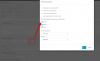
Have you tried disabling audio on start when you create the meeting?
1582535745059.png
 
I don't have Webmeeting Profile, I am up-to-date so that must be disabled somewhere?
 
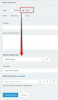
Did you choose the type "video" ?

1582545581588.png
 
This is a major usability issue for us as well. There should be a way to have a web-meeting without computer based audio (dial-in only) .
 
As I described above in post #4 , you can start it without audio if you wish.
 
Status
Not open for further replies.

Forum statistics

Threads
111,973
Messages
590,077
Members
164,896
Latest member
sameage