Solved Webmeeting bridge not working since upgrading to v18 last nite

Status
Not open for further replies.

beurle

Customer
Joined
Jun 10, 2019
Messages
36
Reaction score
4
We upgraded last nite and the webmeeting bridge does not appear to work anymore. Audio from participants joining by computer does not make it thru to the phone system. The phone conference is working, just the bridge is out.

Any suggestions on things to check for troubleshooting?
 
Hi!

You say "Audio from participants joining by computer does not make it thru to the phone system.".

So these participants, are they using their Browser to join the WebMeeting (e.g. Chrome), or dialing the Conference Extension number and inputting a PIN code?
 
  • Like
Reactions: Evolute IT
They are using their browser to join the webmeeting.
 
Thanks for the information.

So when a certain user schedules a Web Meeting, none of the Participants can hear each other, or some can hear and some not?
 
The ones that dial in can hear each other. The ones that join via browser can hear each other. The two groups cannot hear each other.
 
That narrows things down a lot. Could you please check a few things:
  • Run the Firewall Checker from Dashboard --> Firewall. Does it pass? (Even if it's gree, run it again)
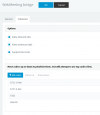
  • Under SIP Trunks --> WebMeeting Bridge --> Advanced tab, do the settings look like this?
    1631778069504.png
  • Is the WebMeeting you are joining via dial in, and Instant/Quick Meeting or a Scheduled Meeting? IF you are doing the a Quick Meeting, please try a scheduled one as well.
 
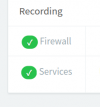
The firewall is green;

firewall.png

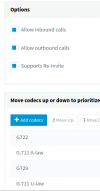
A different order of codecs, we use g722 where we can.

webmeeting.png

This is for a scheduled meeting. We don't get dial in options for quick meeting?
 
@beurle
As I didn't understand, do Scheduled Web Meeting as well have the same problem?
 
Scheduled meetings have the problem.
 
Just an update for this case, if order for Participants joining from a browser to be able to exchange Voice/Audio with Dial-in Participants, the 3CX Server needs to have the RTP Ports open, so the WebMeeting MCU can communicate with your 3CX Server.

One test you can try if you are sure the RTP Ports are open and the Firewall Checker passes, is to go to Settings --> Conference and in the "Video" tab, try another region.
Generally the region should be the one closest to where your Participants are, but as a test you can choose another.
 
Status
Not open for further replies.

Forum statistics

Threads
111,973
Messages
590,076
Members
164,895
Latest member
jasonkkrause