Webmeeting : Error WEBMEETING_PARAMETERS is empty

Status
Not open for further replies.

jwr17

Joined
Mar 17, 2008
Messages
9
Reaction score
1
Hi all
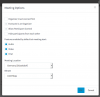
I can't use the Schedule Conference anymore when selecting the webmeeting profile,I get suddenly the error

WEBMEETING_PARAMETERS is empty

Although if I check them they look like they always did (in webmeeting profile)

Any clues? I need to schedule 2 webconferences for next week,,
many thanks
jan
 

Attachments

  • Screen Shot 2018-08-09 at 18.51.24.png
    Screen Shot 2018-08-09 at 18.51.24.png
    46.1 KB · Views: 13
I have the same issue with one of our 2 sites.

One site works fine, however it was reporting that it could not find the cloud url for the web conference, then I went to the 3cx server GUI > settings > conferencing and chose a different server.

Tried this on the second site but it still gives the error: webmeeting_parameters is empty

I have not tried rebooting the server or restarting the services yet because there are calls in progress right now.

Perhaps that will help you.
 
Please restart your 3cx system service and try again.
 
did a restart but still same issue. this is becoming an urgent issue.. any more suggestions please?
many thanks
Jan
 
Same issue here - restarting System Server service had no effect.
 
what are the WEBMEETING_PARAMETERS and what is supposed to be in there?? I?v e paid license and really wpuld appreciate some support to solve this asap. I believe issue was introduced after the last update (webmeeting itself works, it's only when scheduling a webmeeting (video) that this happens.Audio meeting (sheduled) works fine... but that we don't use.
thanks!
 
Same Issue here. I have a demo tomorrow, I really need to get this fixed!
 
Thank you for reporting this.
We've identified an issue with the addition of the "Automatic" MCU selection which seems to be causing this issue and we're working on resolving it.

A fix will become available at approximately 10:00AM GMT+2
You'll need to either wait up to 8 hours for the new "meeting_parameters" sync to occur between your PBX and the WebMeeting server OR you can restart the 3CX System Service to force a re-sync once the issue is resolved.

We apologize for any inconvenience caused by this.
 
Any issues should now be resolved, to continue working normally either wait up to 8 hours for the next re-sync of meeting data or simply restart your 3CX System Service to force a resync.

Shortly after the above, creation of meetings should be working.


Only and only if you're still experiencing the same error even after trying the above a couple of times, please go to "3CX > Settings > Parameters > webmeeting_parameters",delete "webmeeting_parameters" and then restart your 3CX System Service.
 
Status
Not open for further replies.

Forum statistics

Threads
111,891
Messages
589,591
Members
164,758
Latest member
rmf