Webmeeting flow

Status
Not open for further replies.

DaveCo

Free User
Joined
Sep 12, 2020
Messages
15
Reaction score
1
Hi,
How does the webmeeting work if I run a server in my house behind a firwall? Does all the connection run through my server or centrally through 3CX servers? I'm trying to trouble shoot folks connection issues and not sure if it's my internet or theirs.
Thanks
Dave
 
Hi Dave,

Webmeeting runs in our cloud based MCUs so it's independent of your PBX.

The only exception is for dial-in users, which dial into the PBX, and the PBX then bridges them into MCU to merge with the rest of the web based participants. You can ignore this part if there are no dial in users.

If you are hosting a webmeeting and you notice a bandwidth notification, this means that at least one of the participants does not have a fast enough connection. You as the organizer can then click the settings wheel, and reduce the meeting quality on the fly in order to cater for the slower users.

Otherwise, tell us exactly what you mean by connection issues to see if we can help.
 
  • Like
Reactions: DaveCo
Thanks for the response. Another question if I may?

Trying to setup a meeting where participants don't have organizer rights and where I don't have to approve there video and audio access. Just come in and start.

Thanks again
 
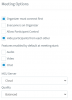
Schedule a video meeting, and use the Webinar profile
1606910888848.png

You can also click the wrench icon and further modify the meeting to your liking
1606910928816.png
 
Very odd, Web meeting every one comes in as an organizer which should not be the case should be an option. none of the option are selectable above, middle two. For a webinar I have to allow everyone to useaudio and video. Even from your pic you can see audio and video greyed out and not selectable. Really this is webmeeting is backwards. Hope to see this improved. thanks
 
Status
Not open for further replies.

Forum statistics

Threads
111,973
Messages
590,078
Members
164,896
Latest member
sameage