Webmeeting invitations are different

Status
Not open for further replies.

PhilK

Forum User
Advanced Certified
Joined
Jul 22, 2019
Messages
147
Reaction score
44
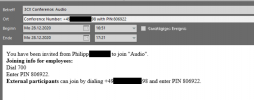
As I have seen in some other posts I have an issue with the webmeeting invitations, but we do not use Office 2007, like the other post, where 3CX posted a microsoft link. We use Office 2016. We are not able to react to invitations for audio conferences via 3CX direct Mail and they don't get in the invited participants calendar. In OWA the invitation isn't even visible in the mailbox, but you get a reminder for it. The three typical buttons for "accept", "with reservation" and "decline" (hope I translated correct, because I'm German and don't know the correct designation) are not available here. When deleting the scheduled meeting in 3CX in the incoming mail, the button for removing out of the calendar is available. For scheduled video meetings everything is normal!
Can you please check the health of the attached .ics-Files? Is there an issue in it? This error occurs since the last final Update for v16 Update 7. See the screenshots attached.

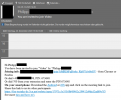
One screenshot is the scheduled audio meeting invitation.
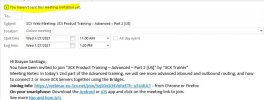
Another one scheduled video meeting invitation.
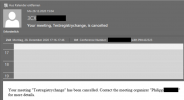
The third is the e-mail after deleting the audio meeting in 3CX. The name of the meeting is "Testregistrychange" because I tested here the registry from another post in this forum.
 

Attachments

  • Removed.png
    Removed.png
    50 KB · Views: 8
  • Video.png
    Video.png
    108.3 KB · Views: 8
  • Audio.png
    Audio.png
    48.8 KB · Views: 8
  • Like
Reactions: Sepultura
Thanks for reporting this. The intention was to not have the RSVP options when the 3CX SMTP is being used, but retain those options if a custom SMTP service is being used.
We'll investigate to see if there is some issue.
 
Thanks for reporting this. The intention was to not have the RSVP options when the 3CX SMTP is being used, but retain those options if a custom SMTP service is being used.
We'll investigate to see if there is some issue.
I have to say that this is a big change for us. We use the 3CX SMTP because it works great but now we have to license new O365 users just for our PBXs. This really sucks.

Zoom sends invite via a no-reply address and they never removed the RSVP. Never.
 
Thanks for reporting this. The intention was to not have the RSVP options when the 3CX SMTP is being used, but retain those options if a custom SMTP service is being used.
We'll investigate to see if there is some issue.
The important thing is that the answer is needed, so that the appointment gets correct into the invited persons calendar. Now the appointments are not in the calendar, only when you open the invitation you can copy the appointment into the calendar. This is not known for the most people, I also just found out, because of this issue. Also I don't know why the invitation for video meetings is still an RSVP, as you can see in the screenshots.

Thank you for checking this. Have a nice day.
I wish 3cx a happy new year.
 
  • Like
Reactions: N_G and Evolute IT
We use the most current Office appliations as well.

This is a major issue. The top 4 forum posts in this section are all about this change.

This change is not a feature enhancement, it is straight up broken.

It was working fine for all calendars before this change was made. This needs to be rolled back.
 
You should send out the mail from the outlook email client. When scheduling the meeting, ensure that the default client is selected then the mail will be sent from Outlook and the buttons should be there?
 
We have decided to train the users on using the option to download the .ics and send the invitation from the Outlook client.

But, I've just noticed that the problem is also there when receiving calendar invites directly from 3CX for events.

Capture.JPG
 
This calendar event was not sent as Mr Galea pointed out and the 3CX SMTP was used.
Try it on your PBX and see how it goes.
 
This calendar event was not sent as Mr Galea pointed out and the 3CX SMTP was used.
Try it on your PBX and see how it goes.
Hello @NickD_3CX,

I'm not sure if you are responding to my post. If so, I believe I did not explain myself correctly. The invite in the image I posted is the invite sent by 3CX after I registered for the 3CX training webinars.

As you can see, not even the invites from 3CX for 3CX own events are coming through correctly.

The Dev team needs to listen to 3CX customers and partners and take the time to understand their concerns.
 
The way forward is for users to send out the mail from their email client. This works perfect for any modern company using a modern, web based email system such as office 365 or google. We are checking for ways to improve the experience for the archaic locally installed outlook.

Also we got your comment re the ICS file and will check it.

Also we are going to reword the drop down as its not clear enough for the average user.
 
Last edited:
  • Like
Reactions: gorbros
Why should I use the email client to send out the invitation for audio meeting, so that people can reply and safe it to their own calendars, but for video meetings the 3CX direct mail works perfect? I don't think there is any difference than the email subject and text.
The problem is not, that the can not reply to audio meeting invitation by 3CX direct mail. The problem is, that they can only save it to their calendar with a workaround and if they don't do that, because they don't know this way and it is awkward, they don't even get any reminder for the meeting. As I told you, this problem is only for scheduled audio meetings, but not for video meetings. I think there is just an issue in the ics file.
What I don't understand. You always talk about improving for office 365 or google. These two are seperated in the drop down, so isn't it correct to use and improve the 3CX direct mail for "archaic locally installed outlook"? In our OWA the incoming mail for audio meetings is not even shown in the mailbox. You just can't find it, because in my opinion, there is an issue in the ics file.

Please check this again. Thank you.
Sorry for my bad English, I'm from Germany.
 
Why should I use the email client to send out the invitation for audio meeting, so that people can reply and safe it to their own calendars, but for video meetings the 3CX direct mail works perfect? I don't think there is any difference than the email subject and text.
Hi PhilK,

When you load an iCal file into your Email Client (e.g. Outlook), then the Meeting that is created has the Users Email as the organizer and they then add the participants from the Email Client. This in turn means that the participants that receive the Meeting Request will see the Organizers Email when they want to respond, so their RSVP answers will be correctly shown in the organizers Email Client.

When using the PBX SMTP to send out the emails to the organizer and participants, granted, the calendar event was added and a popup was shown, but the replies to the RSVP weren't being sent correctly.
Effectively, it was not fully working.

The correct way, when using "fat" clients like Outlook is to use the iCal file and let Outlook run the show.

Do me a favor, try this method and see how it feels:
1. Create Audio Conference with "iCal" selected
2. Download the iCal file and open with Outlook
3. Add the participants emails and press "Send"

I have not been a fan of Email Clients like Outlook for a very very long time, but I used to use it a lot, so I think that for users that still like the way Outlook works, this should be pretty straight forward.
 
Hi PhilK,

When you load an iCal file into your Email Client (e.g. Outlook), then the Meeting that is created has the Users Email as the organizer and they then add the participants from the Email Client. This in turn means that the participants that receive the Meeting Request will see the Organizers Email when they want to respond, so their RSVP answers will be correctly shown in the organizers Email Client.

When using the PBX SMTP to send out the emails to the organizer and participants, granted, the calendar event was added and a popup was shown, but the replies to the RSVP weren't being sent correctly.
Effectively, it was not fully working.

The correct way, when using "fat" clients like Outlook is to use the iCal file and let Outlook run the show.

Do me a favor, try this method and see how it feels:
1. Create Audio Conference with "iCal" selected
2. Download the iCal file and open with Outlook
3. Add the participants emails and press "Send"

I have not been a fan of Email Clients like Outlook for a very very long time, but I used to use it a lot, so I think that for users that still like the way Outlook works, this should be pretty straight forward.
Hi Nick,

thank you for your answer.
What I still don't understand is the difference between audio and video conferences. When we create video meetings with PBX SMTP, this is still a RSVP mail, that arrives at the included users/extensions. Should audio and video noch work the same or is this a problem, because for video meetings the link for each invited user is different and in audio meetings there is no difference in the invitations for all? Please explain this to me.
 
What I still don't understand is the difference between audio and video conferences. When we create video meetings with PBX SMTP, this is still a RSVP mail, that arrives at the included users/extensions. Should audio and video noch work the same or is this a problem, because for video meetings the link for each invited user is different and in audio meetings there is no difference in the invitations for all? Please explain this to me.
This is something we are considering for the reason you said, but it is likely that the "iCal" option will behave like the other calendar options, where the link will be the same for all participants.

It is being considered that unique links per participant will be available only when you send direct emails, but that it what we are trying to see how we can optimize.
 
  • Like
Reactions: PhilK
I have to say that this is a big change for us. We use the 3CX SMTP because it works great but now we have to license new O365 users just for our PBXs. This really sucks.

Zoom sends invite via a no-reply address and they never removed the RSVP. Never.
You don't have to license anything. You must send out the mail using the default email client installed on the machine, be it office 365, free outlook online or free google mail. I dont even understand why you have an issue because you are not using office 365/outlook in the first place.

Now for locally installed outlook we are going to make some changes and are finalizing our research in the coming days and if succesfull will publish an update.
 
  • Like
Reactions: PhilK
You don't have to license anything. You must send out the mail using the default email client installed on the machine, be it office 365, free outlook online or free google mail.

Now for locally installed outlook we are going to make some changes and are finalizing our research in the coming days and if succesfull will publish an update.
Yeah but many people don't use the Web version of Outlook because it's slow as f***. Of course, a plugin for desktop Outlook would be best.

Also, using the 3CX SMTP gave each invitees a unique link to login. Now, they get a single one for everyone and get asked their name... just not the best experience IMO. It was working just fine before.
 
  • Like
Reactions: Sepultura
Thats exactly how zoom works. You just enter your name its OK i think....

No outlook online is very fast actually. So is Google mail.
 
Hello guys,

@Nick Galea thank you for your presence in these forums.

I do not know how format .ics files but a bit of reading up on the .ics standard I was able to learn a few things.

The .ics file that 3CX is sending out from their servers is using the METHOD: PUBLISH. If you guys use the METHOD: REQUEST the Outlook client is able process the .ics file correctly.

There is also an RSVP component that if present will process RSVPs.

May I suggest that when creating the .ics file 3CX change the organizer to the name and email address of the person creating the meeting. As opposed to a "noreply" 3CX address. The reason for suggesting this is that 3CX could include the RSVP component so that the organizer of the meeting can keep track of who Accepted and who Declined.

This information is solely based on the small amount of information I was able gather about the .ics standard.
 
Last edited:
  • Like
Reactions: N_G
Hello,

I've been playing around with the .ics file a bit more. Keep in mind that I do not consider myself an expert in the iCalendar standard. As a matter of fact, today is the first day I've looked at this. In the process I've discovered a few curious facts:
  • When using the RSVP parameter in the .ics file the RSVP is sent from the Attendee's email server. Not from the server for the Organizer nor from 3CX servers.
  • When using the RSVP parameter the RSVP email address must be different from that of the Organizer's email. Otherwise Outlook will state that the Organizer did not request a response.
  • When using METHOD:REQUEST the text in the DESCRIPTION: parameter is not present in the invite.

I may be experiencing these effects because I may be applying the iCalendar standard incorrectly. I'm sure 3CX dev team is more experience with this and will know how to correctly implement the iCalendar standard.

My conclusion is that the root cause of the problem everyone is experiencing in these threads is due to a misconfigured .ics file as opposed to an Outlook issue from 13 years ago.

I'm very curious to see Posts from others who know more about the iCalendar standard.
 
  • Like
Reactions: N_G
@TeKNacion Thank you for your detailed analysis! This is useful feedback.

It should be noted that it very much depends what mail server you are using. Are you using an inhouse mail server? We have to cater for many scenarios and most are using our mail servers as opposed to inhouse mail servers.

We are of course researching this matter and looking for better options. We will certainly make an update to update 7 to improve the meeting invites but we need to finalize our research.
 
Last edited:
  • Like
Reactions: PhilK
Status
Not open for further replies.

Forum statistics

Threads
111,973
Messages
590,078
Members
164,896
Latest member
sameage