Webmeeting invitations are different

Status
Not open for further replies.

PhilK

Forum User
Advanced Certified
Joined
Jul 22, 2019
Messages
147
Reaction score
44
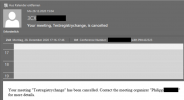
As I have seen in some other posts I have an issue with the webmeeting invitations, but we do not use Office 2007, like the other post, where 3CX posted a microsoft link. We use Office 2016. We are not able to react to invitations for audio conferences via 3CX direct Mail and they don't get in the invited participants calendar. In OWA the invitation isn't even visible in the mailbox, but you get a reminder for it. The three typical buttons for "accept", "with reservation" and "decline" (hope I translated correct, because I'm German and don't know the correct designation) are not available here. When deleting the scheduled meeting in 3CX in the incoming mail, the button for removing out of the calendar is available. For scheduled video meetings everything is normal!
Can you please check the health of the attached .ics-Files? Is there an issue in it? This error occurs since the last final Update for v16 Update 7. See the screenshots attached.

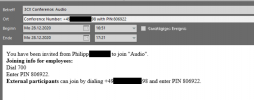
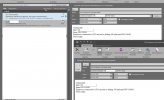
One screenshot is the scheduled audio meeting invitation.
Another one scheduled video meeting invitation.
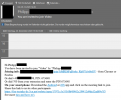
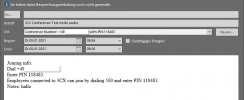
The third is the e-mail after deleting the audio meeting in 3CX. The name of the meeting is "Testregistrychange" because I tested here the registry from another post in this forum.
 

Attachments

  • Removed.png
    Removed.png
    50 KB · Views: 8
  • Video.png
    Video.png
    108.3 KB · Views: 8
  • Audio.png
    Audio.png
    48.8 KB · Views: 8
  • Like
Reactions: Sepultura
....

Do me a favor, try this method and see how it feels:
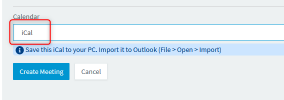
1. Create Audio Conference with "iCal" selected
2. Download the iCal file and open with Outlook
3. Add the participants emails and press "Send"

I have not been a fan of Email Clients like Outlook for a very very long time, but I used to use it a lot, so I think that for users that still like the way Outlook works, this should be pretty straight forward.

Neither do I but I have to agree with PhilK. I'm getting reports all over the company that the e-mail Invites are broken, now I read it is intended.
What should anyone do with that mail in Outlook?
1609833563050.png

It is not in the calendar and differs completely from the webmeeting and you can't do anything with the mail.

Companies massivly jumping to MS Teams because of its good integration in Office applications and easy to use. You making a HUGE step back and using the lack of Zoom comfort as excuse?

For the past 12 months I defended 3CX webmeeting over any other application because of its clientless WebRTC, quality and price but if you continue to "disimprove" the software further we will definitly switch to Teams because the complaining from the colleagues is getting bigger and bigger.
We are a software company and last year we had our 30th anniversary. We have been in the cloud business for over 8 years but even today with the trend towards Azure, users still want to use their fat clients and office applications and rightly so, because they just work. Please let 3CX just work too.

Thanks
 
  • Like
Reactions: Sepultura
What should anyone do with that mail in Outlook?
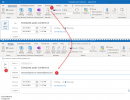
Once you open the iCal with Outlook, there should be an option to invite participants like below.
1609838424034.png
 
Once you open the iCal with Outlook, there should be an option to invite participants like below.
View attachment 19900

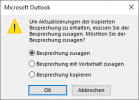
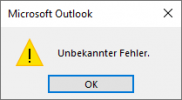
I don't see an iCal attachement in Outlook 2016. I can only click on "Copy to my calendar"
Then this popup shows up
1609838638599.png
1609838649103.png

None of the options work, I will always get the error. In gmail I see the iCal and can add it to my calendar.
This issue has been reported by serveral users in the company, for further investigation I could ask some O365 users.

Outlook:
1609839035776.png
 
Sorry if I wasn't clear, What I did to take this screenshot is when I scheduled the Audio Conference in my WebClient, I selected "iCal" as the Calendar option, then just double-clicked in the ICS file to open it with Outlook.
1609839006535.png
 
Sorry if I wasn't clear, What I did to take this screenshot is when I scheduled the Audio Conference in my WebClient, I selected "iCal" as the Calendar option, then just double-clicked in the ICS file to open it with Outlook.
View attachment 19903

We don't use this option as its not convenient and only work with a full browser (we use 3cx in an app, which downloads the .ics silently in to /Downloads).
 
We also use 3CX as a Google Chrome App, but normally our Users use Firefox and a Download in 3CX opens an separate Chrome window. The iCal is a possibility, but it is cumbersome/awkward.
@Nick Galea - at the moment there is a dropdown menu for the kind of scheduling i want to choose. I read in another message from you, that you want to rename this dropdown, because you think it leads to confuse. Don't you think there may be a possibility to add the old 3CX direct mail option, working with Outlook fat installations as a new option and to continue the optimizations for the ics file for web applications like gmail and stuff like that in another option in the dropdown?
Maybe the dropdown could be interactive, if we have not configured office 365, google or outlook online integrations, the option could also be hidden in the dropdown. The options for iCal, 3CX direct mail for Outlook and the optimized direct mail ics or whatever you will name these options could be hidden by 3CX admins in a setting for this and maybe there is a way to add a little interactive description for each option, shown when a customer drives over it with its cursor, that is available in all languages that are available in 3CX?

Can you follow me and can you imagine to do so?
 
No the invites have to be sent from the email client. For google, office 365, outlook online users this will work perfect. For full fat outlook installs without office 365 we are checking new options for now we are still researching.

Yes for v18 we want to allow editing of the list so the admins can select a default and maybe even remove options that dont work for the install/company.
 
@fc_sys why cant you select the gmail option and have it open gmail if you have that?
 
Why not just add a "none" option to the dropdown? Then display all the links in plaintext and allow folks to copy and paste as they please.
 
  • Like
Reactions: PhilK
Status
Not open for further replies.

Forum statistics

Threads
111,973
Messages
590,078
Members
164,896
Latest member
sameage