Solved Webmeeting is disabled for this extension: access denied

Status
Not open for further replies.

PatrickMcLeanCI

Free User
Advanced Certified
Joined
Sep 7, 2021
Messages
27
Reaction score
3
I followed the steps in the previous thread I was reading to turn on the Click2Talk and did so for both extensions that I am trying to test with one another, but when I try to send a Webmeeting request through the "Team" section on the webclient I get this error.
 
Hi @PatrickMcLeanCI,

Does the extension have a valid email address entered in?
 
Hi @PatrickMcLeanCI,

Does the extension have a valid email address entered in?
Receiving or initiating?

Both do in this case, as I was receiving a different error before that was mentioning no valid email.

But its added for both receiving and initiating extensions now and I am still receiving the error.
 
Actually disregard this thread I resolved the issue.
 
Great to hear, if you'd like to fill us in as to what happened for others who may have a similar issue and will read this, feel free!
 
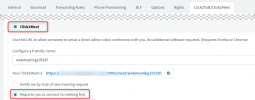
In the Extension Settings make sure you have Click2Meet enabled (you said Click2Talk above...) AND "Requires you to connect to meeting first".
1634653513654.png


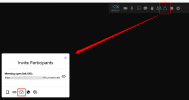
Then in the Quick Meeting, you should see the option to invite others:
1634653563328.png


Sorry if I am off-topic, in the original post there was no error screenshot (it was probably censored...)
 
I was being dumb and working too fast and forgot the Click2Meet on one extension (I was only turning on the Click2Talk).
 
Status
Not open for further replies.

Forum statistics

Threads
111,973
Messages
590,076
Members
164,895
Latest member
jasonkkrause