Solved WebMeeting no longer working post migration to Azure or update to 16.0.5.611

Status
Not open for further replies.

lucasco

Free User
Joined
May 3, 2020
Messages
32
Reaction score
6
I was running an onsite Linux based install of 3CX standard. I have successfully migrated this install to the Azure Cloud (still based on Linux, using the 3CX Azure Marketplace installer). In terms of the PBX itself, all functionality is working fine.

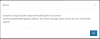
However, if I log into the Web Client with Chrome and go to the WebMeeting tile on the left of the browser, I just get a blank screen, nothing happens. If I try and initiate a WebMeeting directly with another user under the 'People' tile, I get the following error message:
1588467618254.png

Error

Exception of type System.ArgumentNullException occured in 'DoProcessWebMeetingStateCallback' line 1484. Message: Value cannot be null. (Parameter 'path2')


I've tried different systems and removed and reinstalled the 3CX Extension on Chrome, or tried on systems where the extension has never been installed, and it's always the same problem.

Before the migration, WebMeeting worked fine. I'm willing to accept it's something to do with the migration, but any ideas what? I looked at whether I need to do something with unbounding the license, but all seems well on that score in the 'End Users Area'. To throw into the mix, I upgraded to the 16.0.5.611 release as soon as I was migrated into Azure, but the one thing I didn't test before doing this was the WebMeeting (my bad). So I can't be sure whether this is an issue with the update or migration.

Any thoughts appreciated - thanks :)
 
To add, the 'new' 3CX server in Azure is showing as fully activated and licensed, and in the End Users Area it acknowledges the new public fixed IP address of the Azure based server successfully. The 'old' 3CX server is off, and has had it's virtual network removed (but can be re-enabled if there is something I need to rescind on there). Thanks
 
Hi,

How was the migration performed exactly?

And can we see the firewall rules for that VM?
 
Hi John.

Thanks for your reply. So in the end, I ran the setup for '3CX Phone System' on Azure using the installer from the Azure Marketplace.

I ran a backup from the onsite 3CX server, opting to omit the FQDN and the license number.

Once the Azure based 3CX server was up and running, I didn't want to use the web based installation method, as it seems you can only use HTTP (not HTTPS) provisionally which is less than ideal from a security perspective when restoring a backup (even if the backup is password protected). So I found a way of invoking the command line setup via SSH / Putty.

This seemed to work fine, with me restoring the password protected backup from the local file system on the Azure hosted 3CX (uploaded through SFTP). It automatically picked up on our <host>.3cx.co.uk based hostname, and I was able to re-enter our license key. From then on, all was good with the phone system side - it seems to only be WebMeeting that has problems.

I assume all the ports were setup when the 3CX Phone System was setup, and certainly the firewall test from the 3CX server confirms all is good. But perhaps this doesn't check or allow in the initial config for some key ports used by WebMeeting? Here is the list of all open ports at present that have been enabled by the 3CX installer:

1588612627871.png

Any thoughts you have would be great.

Many thanks
 
Any thoughts on this? Does my configuration look correct? Should I perhaps just blow away what I have setup in Azure and start again, and if so will I have to seek a new license number and hostname to progress?

Thanks
 
You can send me a private message if you want.

Create a new extension, leave all the settings "as-is" just add a valid email address to it.

Send me your url / user / pass and I will try from my end too.
 
You can send me a private message if you want.

Create a new extension, leave all the settings "as-is" just add a valid email address to it.

Send me your url / user / pass and I will try from my end too.
Thanks for the offer John, that would be great if you ok to take a look?

Just to check, the only option I can find like sending a private message is to 'start a conversation' - to be sure is this the same thing? I don't want to make a school boy error and end up sharing access details in the public domain!

As soon as I hear back, I'll send the details through.

Many thanks :-)
 
Yep, thats correct. Start a private convesation with my username
 
Hi John,

Sorry for the silence for a couple of days. Over the bank holiday weekend I installed a new instance of 3CX in the Azure Cloud. I did it exactly the same way as before, from the re-invoked command line install option post initially setup from the Marketplace, but this time I used a newly procured license and set with a different host name.

The result, at least initially, was that absolutely everything worked straight off the bat. I compared firewall settings between the two VMs (having kept the old one off but available) and everything was identical. Notably, the new server now allows emails to be sent which the prior one didn't.

I'm not going to continue analysing the old VM, but my strongest suspicions are that either something really didn't migrate well in the original Azure installation process, or that something on 3CX's side was not happy with the change, and the license / host name never got totally released from the original onsite setup.

A new totally different problem has developed on the newer Azure VM today, but I'm going to open a different ticket for this instead of breaking etiquette and posting it on this.

Thanks very much for trying to help with this problem - it would have been nice to properly fix the problem on the old VM but just one of those things I'll keep in mind for migrations in the future! By the way, I tried to use the 'Generate Support Info' on the old VM, but have no idea where it placed the result as I could not receive the email post it doing this. There was also no option I recall to set a password on this, as I think you may have mentioned was possible.

Many thanks :-)
 
Make sure not to skip the very important step on Azure. The script from the marketplace does not add UDP 9000-10999 to the inbound filter rules in the NSG. Add them.
 
Thanks for that, Nick. If you look further up in the post you'll see a screenshot of all my open ports on Azure, and those were added in from the start. John checked that from his side too and confirmed all was good. I've run the firewall checker each time and all is good there too.

I've also followed the official 3CX guides closely each time, with the only exception being that I used one of the built in scripts to re-invoke the initial setup from the command line interface (via Putty) as the web setup method that defaults on Azure can only use HTTP as the cert isn't in place at that point, which in my book is very insecure indeed!
 
Apologies, I missed that.
 
No worries, thanks for trying to help! :)
 
Hi @lucasco

If that specific key was affected, its entirely possible that some of the parameters in the machine did not match with what was stored on our ERP. In that case I would expect the above failure, but we would need the Support Info file which resides here: /var/lib/3cxpbx/Instance1/Data/WebSitesTemp

I'm glad all is sorted for now at least.
 
Status
Not open for further replies.

Forum statistics

Threads
111,973
Messages
590,076
Members
164,895
Latest member
jasonkkrause