Webmeeting Profile

Status
Not open for further replies.

tkSwaggyDaggy

Forum User
Joined
Jul 9, 2019
Messages
8
Reaction score
5
Hi,

if I am planning a new conference I can choose between two profiles
WebMeeting and
Webinar (Classroom)

Unfortunately I don't see any option to change the WebMeeting profile (all greyed out) and no way to create a new default one.
We need to set the default behavior so that the invited participants dont get organisator rights.

Any help appreciated
Thanks in advance
 
Hello,

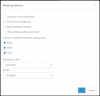
This is Webmeeting
1584693999268.png

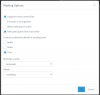
This is Webinar
1584694029287.png

As you see, they are profiles of the same thing, so if you wish to control the conditions, simply choose Webinar and edit them as per your needs. For the moment there is not default mode, you will have to choose manually whenever you schedule.

Just instruct your users to select "Webinar" whenever they create a meeting.
 
Hi John/All,

Question on this. Why is the top options grayed out for webmeetings but not for webinars?
We have issues with that people connects immediately when they get the invite and don't see the timing that is 2 days later etc. The "Organizer must connect first" option is needed for all scheduled meetings....this is my opinion.

Or do I think wrong here or simply use webinars for everything?
 
We provide 2 different profiles, the webinar one basically lets you the top options too if you need to do so.

The "user error" you are facing of course will still occur [even when organizer must connect first], they will click it, and come ask you why its not working :D
 
Last edited:
so basically...don't select webmeeting ever but select webinar to get all features...strange setup but ok.
Webinar would then be great to be default.....never mind..... its a matter of instructions to the staff at the moment:)
 
We provide 2 different profiles, the webinar one basically lets you the top options too if you need to do so.

The "user error" you are facing of course will still occur [even when organizer must connect first], they will click it, and come ask you why its not working :D

There is apProblem with this approach!

It works well with the webinar profile that the connected users are not organizers.
BUT when they mute theirselves and then want to un-mute it does not work.
Only the organizor can un-mute them.

If we use the Webmeeting profile where everyone is organizer at start, and we set the users to lower rights, then they can mute and unmute.

Please give the possibility to disable the "Everyone is an Organizer" checkbox in the Webmeeting profile.
It is very important for us.
 
  • Like
Reactions: Connexium Partner
Status
Not open for further replies.

Forum statistics

Threads
111,973
Messages
590,078
Members
164,896
Latest member
sameage