- Joined
- Mar 23, 2020
- Messages
- 6
- Reaction score
- 0
Greetings, colleagues!
English in not my native language so please go easy on me.
I'm already tired of banging my head against the wall, so here I'm asking for your help. Maybe some of you here have already faced such a problem and maybe even found a solution.
We do have our server with 3cx running on it (Debian 9). The 3cx server version is 16.0.3.676.
On the border between the internet and our 3cx server there is a CheckPoint firewall. We have followed the offical documentation (https://www.3cx.com/docs/ports/) on what ports are need to be opened. And for now everything outside an office works fine except for WebMeeting.
And by saying this I mean you can open https://our.3cx.org:5001/webclient site, enter your extension number and password and call or chat to any of your colleagues. Everything works fine but for webmeeting tab.
When one open a webmeeting tab he (or she) would face a "response timeout for [our.3cx.org]" problem (screenshot included).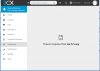
I tried to change WebMeeting MCU from AUTO to something particular (germany, uk, etc) but it didn't help.
And maybe this could be useful. I "pinged" a few of MCU's avaliable from the list (like "ping aa03-fra.3cx.net") and tried to add the IP-adress I got to "Security -> IP Blacklist" as a whitelist IP, but I faced the "An IP adress is already blacklisted" caption while there is no such IP in the list at all.
Please advise what to look for, which logs (and where I can find em) to read and what I can try to do to solve the problem. I've already tried everything I can, but without success. All hope for you guys.
English in not my native language so please go easy on me.
I'm already tired of banging my head against the wall, so here I'm asking for your help. Maybe some of you here have already faced such a problem and maybe even found a solution.
We do have our server with 3cx running on it (Debian 9). The 3cx server version is 16.0.3.676.
On the border between the internet and our 3cx server there is a CheckPoint firewall. We have followed the offical documentation (https://www.3cx.com/docs/ports/) on what ports are need to be opened. And for now everything outside an office works fine except for WebMeeting.
And by saying this I mean you can open https://our.3cx.org:5001/webclient site, enter your extension number and password and call or chat to any of your colleagues. Everything works fine but for webmeeting tab.
When one open a webmeeting tab he (or she) would face a "response timeout for [our.3cx.org]" problem (screenshot included).
I tried to change WebMeeting MCU from AUTO to something particular (germany, uk, etc) but it didn't help.
And maybe this could be useful. I "pinged" a few of MCU's avaliable from the list (like "ping aa03-fra.3cx.net") and tried to add the IP-adress I got to "Security -> IP Blacklist" as a whitelist IP, but I faced the "An IP adress is already blacklisted" caption while there is no such IP in the list at all.
Please advise what to look for, which logs (and where I can find em) to read and what I can try to do to solve the problem. I've already tried everything I can, but without success. All hope for you guys.

 Anyway thank you so much for our response, I appreciate it.