Regarding your question and from the description of the cause, and if I have understood correctly, the desktop app is left open after the computer hibernates or sleeps or network connections are closed or changed, so the networking is stopped, and the desktop app disconnects.
net::ERR_INTERNET_DISCONNECTED
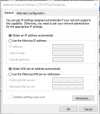
Therefore, the advice here will be to either set the power mode not to sleep/shut down the nic or close the desktop app and re-open it after the computer wakes up and the network is available. This particularly applies when changing from doc, wifi to lan, etc., as Ip addresses may also change here, depending on your network's configuration.
The bottom line is if networking is lost, the app will disconnect, and reconnecting requires it to be restarted due to the network being unavailable.
Having said this, I have performed some tests with the latest Update 6 and the latest desktop app version with tested headsets (Yealink). However, in my case, no software to interfere with the traffic was installed, and by switching the network from Lan to Wifi, I could not replicate this issue. The Desktop app reconnects after a short period once network connectivity is re-established.
Therefore, I recommend updating the system to 6 and the desktop app to the latest version and then checking the laptop and the networking side.
Thanks for responding Charles.
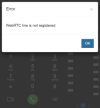
I will admit getting examples of this is going to hard - for me and my team it does not happen //every// time we move from networks or come back from sleep, just sometimes. So I'm assuming it's just bad timing for a heartbeat or some form of process (local or server side) that attempts to do something while networking is not available, and the desktop app is then offline without visible failure.
I understand that the desktop app is effectively just a browser/wrapper for the web version anyway, and I think that may be helpful to dive into. In the same way that a web page of any kind with a session can time out or fail if network connectivity is lost or if the laptop went to sleep, I get that this would happen with the 3CX web client. In all those cases, including the 3CX web client, I just refresh the page and everything gets back to normal, registers, etc. However there is no Refresh or Re-register on the desktop app, just a webpage stuck on the way things were whenever it stopped working.
To get to the core of the problem: Using the desktop app:
- it can randomly end up in a disconnected/failed state;
- I can't easily tell that this is the case; and
- when I discover that it is, the process is annoying (killing the app via the system tray, and restarting it), and not as simple and well known as "just hit F5".
Of all of these, the biggest problem is the app being in a failed state but looking like it's still live. If there was some way for their to be a visible notification of the problem, before we go to attempt to use the phone or find that people have been trying to call us, even if that is as simple as to show no data at all, no calls, extensions, etc... Well, it's not a solution, but at least then I wouldn't look like an idiot waiting for a call that will never come.