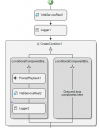
webservice

Soli

Platinum Distributor
Advanced Certified
Joined
Feb 14, 2016
Messages
167
Reaction score
42
Hi

I’m working with Call Flow Designer and using Web Service components.

My flow is as follows:
  1. The first Web Service is called and returns a valid response.
  2. After that, I play an audio message that is about 20 seconds long.
  3. Only after the audio finishes, the call should continue to a second Web Service, which should then return another response.

However, in practice, the second Web Service is triggered almost immediately (after about one second), instead of waiting for the 20 second audio message to finish.


My main requirement is that the second Web Service will be executed only after the audio playback is fully completed.


Is this expected behavior?
How can I make sure that the second Web Service runs strictly after the audio message ends?

Thanks in advance for your help.
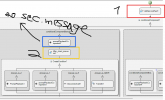
1765876309659.png
 
Is this expected behavior?
no

Was the option 'Accept DTMF Input' disabled in the CFD module?
Does the announcement actually exist, and can the CFD app access and play it? Has this been tested before?

I would set the 3CX Activity log logging level to verbose and check the 3CXCallFlow.log to see at what time which component is called with which parameters. I might also add custom logger modules and check that in the log.
 
In 3cx logs i can see that the first one is on i received response then it move to play the message (which is working properly) and after one second the second Webservice is on so it's not waiting for the message to fully played it's just trigger it and move to the next thing which is the webservice
 
Just for you I tested it - just to be sure, you never know ...

This little functional snippet works exactly as expected: REST request, playback of the entire audio and only after that does the next request come.
1765881096558.png
 
Hi,

What's the PBX version/install and what version of CFD are you running?
 
  • Like
Reactions: fxbastler
After that, I play an audio message that is about 20 seconds long.
What exactly is being played?
A single file that is permanently stored in the CFD app, a dynamic selection, a mixed variety? Please describe it.
 
it play single file

PBX Version 20.0 Update 7 (Build 1080 Release
CF 20.2.84.0
 
As written and rebuilt and tested for you once again: this should work. That's how I know it as well.

What happens if you further reduce the CFD code or simplify the API request for testing?

For the test example, I sent a simple GET request to https://ifconfig.me/ip, so it's not a fully-fledged REST request with login, headers and data.
 
first thank you very much

did you check in call flow logs and saw that the second request is really after 20 seconds in your example?
 
did you check in call flow logs and saw that the second request is really after 20 seconds in your example?
yes

If I reduce the log level and logger output is on error, it looks like this:
Code:
2025/12/16 12:26:21.216|0005|Info| New Severity is set Warning
2025/12/16 12:26:29.323|0015|Erro| [_3CX.Script] _878_58.Main.448.[C:91.2]-Logger1 - CallFlow.CFD.LoggerComponent 'Logger1' - ***** LOGGER1 |xxxxxxxxxxxxx|
2025/12/16 12:26:39.154|0015|Erro| [_3CX.Script] _878_58.Main.448.[C:91.2]-Logger2 - CallFlow.CFD.LoggerComponent 'Logger2' - ***** LOGGER2 |xxxxxxxxxxxxx|

My audio file isn’t 20 seconds long, it’s shorter, but it plays fully. The length shouldn't matter, not in this case :D
 
thank you
i guess it's a bug or something
 
  • Haha
Reactions: KyriacosS_3CX
I'm still facing the same issue any other thoughts ?

2025/12/17 11:30:32.754|0010|Info| [_3CX.HttpClient] Received '200 OK' after 1088.9ms
2025/12/17 11:30:32.754|0010|Trac| [_3CX.Script] _698_37.Main.30.[C:7.3]-WebServiceRest1 - CallFlow.CFD.WebInteractionComponent 'WebServiceRest1' - End executing component with ResponseStatusCode='200' - ResponseContent: {"code":2,"message":"phone is not registered"}
2025/12/17 11:30:32.754|0010|Trac| [_3CX.Script] _698_37.Main.30.[C:7.3]-Webhook - CallID 00000000-01dc-6f37-c9b0-d3cf00000007 - Callflow - Start executing component 'conditionalComponent1'
2025/12/17 11:30:32.754|0010|Trac| [_3CX.Script] _698_37.Main.30.[C:7.3]-conditionalComponent1 - CallFlow.CFD.ConditionalComponent 'conditionalComponent1' - Evaluating condition for branch 'conditionalComponentBranch1'
2025/12/17 11:30:32.754|0010|Trac| [_3CX.Script] _698_37.Main.30.[C:7.3]-conditionalComponent1 - CallFlow.CFD.ConditionalComponent 'conditionalComponent1' - Condition evaluated to true for branch 'conditionalComponentBranch1', executing inner components
2025/12/17 11:30:32.754|0010|Trac| [_3CX.Script] _698_37.Main.30.[C:7.3]-conditionalComponent1 - CallFlow.CFD.ConditionalComponent 'conditionalComponent1' - Start executing branch 'conditionalComponentBranch1'
2025/12/17 11:30:32.755|0010|Trac| [_3CX.Script] _698_37.Main.30.[C:7.3]-conditionalComponentBranch1 - CallFlow.CFD.SequenceContainerComponent 'conditionalComponentBranch1' - No inner components, moving to the next component...
2025/12/17 11:30:32.755|0010|Trac| [_3CX.Script] _698_37.Main.30.[C:7.3]-Webhook - CallID 00000000-01dc-6f37-c9b0-d3cf00000007 - Callflow - Start executing component 'promptPlaybackComponent2'
2025/12/17 11:30:32.755|0010|Trac| [_3CX.Script] _698_37.Main.30.[C:7.3]-Webhook - CallID 00000000-01dc-6f37-c9b0-d3cf00000007 - Callflow - Start executing component 'After_client_answered'
2025/12/17 11:30:32.755|0010|Trac| [_3CX.Script] _698_37.Main.30.[C:7.3]-After_client_answered - CallFlow.CFD.WebInteractionComponent 'After_client_answered' - Start executing component with uri='https://api-ivr-avalon.dialmyapp.com/integration/avalon/call' - httpMethod='POST' - contentType='application/json' - content='********************************************
2025/12/17 11:30:32.755|0010|Info| [_3CX.HttpClient] Sending 'POST/1.1' to '*******'
2025/12/17 11:30:33.408|0010|Info| [_3CX.HttpClient] Received '200 OK' after 652.6ms
2025/12/17 11:30:33.409|0010|Trac| [_3CX.Script] _698_37.Main.30.[C:7.3]-After_client_answered - CallFlow.CFD.WebInteractionComponent 'After_client_answered' - End executing component with ResponseStatusCode='200' - ResponseContent: {"code":4,"message":"Profile wasn't opened"}


The first webservice is working fine than I hear the 20 seconds Message like the flow should be but in the same time the second Webservice stats and not after the message end which cause the Response code to be wrong
 
I am observing similar issues with my CFD projects that are not even related to Web Services. These are projects that were built years ago and had been working fine until recently. It seems as if the call flow process sometimes executes components far ahead of the caller's actual position in the script.

As a workaround, I propose changing the Prompt Playback component. Instead, use the Menu component. Set the Timeout to 1 second and Max Retries to 1, then place your audio file in the Initial Prompt. This seems to work for me, as the Menu component forces the script to wait for the caller's choice, which pauses further execution until that moment.
 
Hello @Soli,

In your Prompt Playback component, ensure that the property AcceptDtmfInput is set to false. This setting controls if the message is queued to be played later, or it is played immediately. If the AcceptDtmfInput property is set to true, the prompt is just added to a queue, to be played in the next Menu or User Input. This allows the user to cut through with a DTMF.

That will solve the issue.
 
@Soli

You must have changed something critical in the call flow. The log output doesn't match the image you showed above. The Line
2025/12/17 11:30:32.755|0010|Trac| [_3CX.Script] _698_37.Main.30.[C:7.3]-conditionalComponentBranch1 - CallFlow.CFD.SequenceContainerComponent 'conditionalComponentBranch1' - No inner components, moving to the next component...
indicates that there are no CFD components in that branch. This line should instead have the following content:
Code:
conditionalComponentBranch1 - CallFlow.CFD.SequenceContainerComponent 'conditionalComponentBranch1' - Start executing component 'promptPlaybackComponent2'
Please take a actual screenshot of the CFD project.

Alternatively, clean up your CFD project by removing any sensitive information and post the entire packed CFD project here.

One more question: Is this a Windows or a Debian 3CX?
 
  • Like
Reactions: Evolute IT
@edossantos_sipcaller

What can you do, people just don’t listen …
Yes, I saw your question regarding this, but it seems this was not changed, because what the user describes is exactly what this property will do. I was trying to be more precise in terms of where the setting should be changed. By doing this change the issue should be solved.
 
I am observing similar issues with my CFD projects that are not even related to Web Services. These are projects that were built years ago and had been working fine until recently. It seems as if the call flow process sometimes executes components far ahead of the caller's actual position in the script.

As a workaround, I propose changing the Prompt Playback component. Instead, use the Menu component. Set the Timeout to 1 second and Max Retries to 1, then place your audio file in the Initial Prompt. This seems to work for me, as the Menu component forces the script to wait for the caller's choice, which pauses further execution until that moment.
Maybe other problem, maybe other solution, but pls. look at the latter answers above.

You say that the projects have been running for many years: were the projects recreated with the current v20 CFD after the 3CX upgrade to v20?
 

Latest Posts

Forum statistics

Threads
111,848
Messages
589,352
Members
164,683
Latest member
sjacquart