What you could do is forward the main trunk number to the dummy extension and set up exceptions for the different office hours you want.
So for example you want something like this for the weekends:
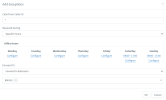
The "*" in the "Calls From Caller ID" will match all calls so you can route all calls arriving on weekends during office hours to the correct Ring Group.
Similarly you will need 2 more rules, one for in office hours during week days and one for out of office hours.
I would recommend testing the set up before applying it to make sure everything works.
If you have global office hours set up you could also use the in and out of office hours settings of the dummy extension to route calls.
When in office hours just forward the calls to the Ring Group you already have like you normally do. And once out of office use the exception again to manage routing. This is a bit more complicated to set up but can offer more flexibility down the line.
Another way to do this although not sure this applies to you, is to set up the 24 of the existing 26 extensions to auto switch once out of office hours.
So when out of office hours are applied the 24 extensions will switch to DND and will not accept calls while the remaining 2 will. Of course if these 2 extensions change every weekend you will need to make the necessary changes every Friday.


