


- Joined
- Oct 21, 2021
- Messages
- 7
- Reaction score
- 3
Hi All,
As above, the welcome email is not sending. The SMTP test returns the following:
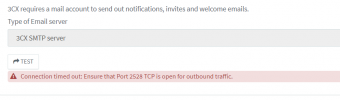
I do not manage the network there however i've been assured that this port is open.
Additional information:
Version: 18.0 Update 2 (Build 315)
Operating System: Windows 10 Pro
Location: on premises
Firewall check: All green (except SIP ALG - this one will be removed soon but shouldn't affect this I'd have thought?)
This feature was previously working but has since stopped.
I'm not the only one with admin access to the system. Is there a setting that might've been changed or something I've missed?
Thanks
Dan
As above, the welcome email is not sending. The SMTP test returns the following:
I do not manage the network there however i've been assured that this port is open.
Additional information:
Version: 18.0 Update 2 (Build 315)
Operating System: Windows 10 Pro
Location: on premises
Firewall check: All green (except SIP ALG - this one will be removed soon but shouldn't affect this I'd have thought?)
This feature was previously working but has since stopped.
I'm not the only one with admin access to the system. Is there a setting that might've been changed or something I've missed?
Thanks
Dan


