Welcome Email Windows Desktop App Link / Answer touch Jabra

Status
Not open for further replies.

GueZ

Silver Partner
Advanced Certified
Joined
Oct 24, 2018
Messages
8
Reaction score
0
Hello,

Can someone tell me why, in the welcome email there is still the link for the Windows v.16 App? And not the new v.18?

With this new desktop app in 5 call 1 is not possible to answer with the touch in the headset, and happens with all office collègues, does anyone remarked the same? But for ending the call all ok every time.

Thanks
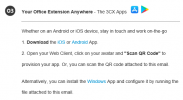
 
The link is in the welcome email, in section 03 - 'Alternatively, you can install the Windows App and configure it by running the file attached to this email.'

1629123359448.png

The download link Windows
 
The link in our welcome emails is the v16 and not the v18 i had to go in the webclient to be able to download the v18. And now i have collègues that do not want to use the v18 because they say ahhh but the link from 3cx is the correct one (v16) =/
 
The link in our welcome emails is the v16 and not the v18 i had to go in the webclient to be able to download the v18. And now i have collègues that do not want to use the v18 because they say ahhh but the link from 3cx is the correct one (v16) =/
The old/legacy Windows App, should continue to work exactly as it did before and we are not planning on deprecating it just yet.

All new features however will be coming to the new Desktop App.

If you have colleagues that believe the Welcome Email more than you, simple, just go in, change the Welcome Email, remove that line, re-send them. Done.
 
section 3.png

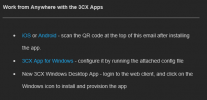
This is what I get in the welcome email for section 3 after upgrading to V18.

There is no link for the new windows desktop app, and dragging and dropping the .3cxconfig file onto the app after installation does not seem to provision the app.
 
There is no link for the new windows desktop app,
Log into a WebClient from any PC that does not have the new Desktop App installed and you should be able to download it from there.
Alternatively, the MSI file exists on the 3CX Server in this path: /var/lib/3cxpbx/Instance1/Data/Http/electron/windows/

and dragging and dropping the .3cxconfig file onto the app after installation does not seem to provision the app.
If you are talking about the new Desktop App, then yes, that is correct. You need to press the "Provision" button from the WebClient.
Only the old/legacy Windows App can be provisioned that way, as also described in the screenshot you posted.
 
Status
Not open for further replies.

Forum statistics

Threads
112,349
Messages
592,027
Members
165,513
Latest member
megalmazan