wh62 yealink headsets and PC client.

Status
Not open for further replies.

Mick Lenton

Gold Partner
Basic Certified
Joined
Apr 22, 2022
Messages
38
Reaction score
2
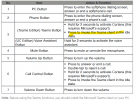
I'm trying to set up a customer with the WH62 Yea link Bluetooth headsets on their PCs which they also have Teams installed. It seems that teams wants to control the headsets. I had to go into device manager and disable the HID headset driver. Has anyone had experience with these headsets and the PC client. The customer is also asking about using it like a Ehs headset and pressing the headset button to answer calls. Has anyone had any experience with this as well. Thanks.
 
We use the WH62 teams specific headset and have no issues.

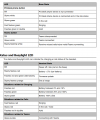
Have you set up the 3CX app to use the Yealink Headset?

1690376704482.png

You can use the call pickup button on the headset to answer calls.
 
  • Like
Reactions: Mick Lenton
Also make sure you've got the Yealink USB Connect software installed as you can configure stuff there too.
 
We use the WH62 teams specific headset and have no issues.

Have you set up the 3CX app to use the Yealink Headset?

View attachment 36501

You can use the call pickup button on the headset to answer calls.
Thanks. I did set that up. The headset seemed to default being a team's headset. And the side button flashed blue and every time you pressed it,it launched the Teams application, so I google about the headset, and it suggested the device manager fix.
 
Pressing the button will bring Teams to the front.

1690377705828.png

But it also picks up the calls too.

Are you using it with 3CX softphone or a handset?
 
1690377962181.png
 
Status
Not open for further replies.

Forum statistics

Threads
111,993
Messages
590,175
Members
164,931
Latest member
admintest