What happens during Outside Office Hours

Digital-Stewards

Silver Partner
Basic Certified
Joined
Oct 30, 2020
Messages
53
Reaction score
8
I know how to handle a call outside office hours when it is routed to a group or queue. But I have one public number that is directly routed to an extension.
But how/where do I make sure a message is played outside office hours on this number?
 
If this is a user extension, use presence to control where the call is routed. Or you can route the call to an IVR outside of business hours.
 
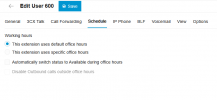
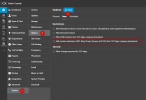
You can use the Schedule feature (Console > User > Schedule > enable use specific office hour > enable automatic switch status) this will change the extension status to DND mode in out office hour. After that you can change the voicemail voice prompt or you can direct to the IVR Closed office.
 
I can only choose to set to Available DURING office hours:

1736235932553.png
There is no option what to do OUTSIDE office hours....

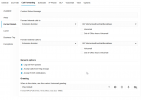
Or does it switch to the DND states automatically and do I need to check the checkbox (out of office hourse voicemail? or what is the purpose of that anyway?)

1736236028649.png
 
I can only choose to set to Available DURING office hours:

View attachment 45863
There is no option what to do OUTSIDE office hours....

Or does it switch to the DND states automatically and do I need to check the checkbox (out of office hourse voicemail? or what is the purpose of that anyway?)

View attachment 45864

?
 
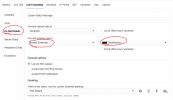
you need to enable "automatic switch status to available during office hours" this will make the extension automatically change its status to DND outside of office hours, if you have done this, move to the call forwarding menu > Do Not Disturb > Forward > System Extension > your out office hour greeting.

1736236757142.png
 
But does it also change it to available during office hours? Because sometimes the extension is being set to eg away instead of available....So it should not always change to available automatically.
 
will automatically change status to available during working hours
 
So if the office hours are 9-12 and 14-17hours.
It jumps to DND from 12-14 and from 17-9.
But what if they want a different message played between 12 and 14?
 
yeah, in my case, our office hour is 9:00 - 17:00, which means 9:00 - 17:00 available, 17:01 - 8:59 DND (automatic change status).
 
So if the office hours are 9-12 and 14-17hours.
It jumps to DND from 12-14 and from 17-9.
But what if they want a different message played between 12 and 14?
Mybe you mean a Break Hour on Office Hour setting? it will be away status, you can forward to another Greeting or you just change your voicemail greeting
 
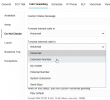
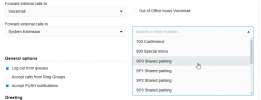
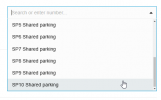
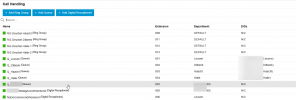
Weird, when in DND I would like to send the call now to a Queue , but in Extension Number of System Extension I do not see any numbers created in Call Handling ... ?!


1736242979964.png
 
Check your settings, you can see my capture when setting up Call Forwarding, also check whether you have really saved your configuration.

 
Yes, but I don't get a list of the Queues or Ring Groups or Digital R. when choosing System Extension:

1736243695447.png
1736243713460.png
 
  • Like
Reactions: Fabian Jsn
Ok that helps, but are they then also visible in the app for the users? Stupid option if so...
 

Latest Posts

Forum statistics

Threads
111,962
Messages
589,993
Members
164,867
Latest member
swegner