What permissions does it take for a user to see Reporting -> Call Log?

Status
Not open for further replies.

ElementalWindX

Bronze Partner
Advanced Certified
Joined
Oct 24, 2018
Messages
367
Reaction score
40
I have a user set as the system admin in her default group membership. She's also a group member of another group with not the same permissions.

In the default tab, it shows her as the system admin, below she is checked for "Allow access to 3cx management console" and she can manage all extensions. All checkboxes below that except "SIP Trunks Administration" are checked.


Yet she cannot see Reporting -> Call Log. All she sees below Reporting is CDR.

Thanks.
 
  • Like
Reactions: TSlocum
I found that setting the extension to System Owner makes call logs show up.

If the extension is a System Owner, the Allow access to 3CX management console settings make no difference whether they can access the console or not.

I feel like this is a major security risk, giving a user the highest privileges just to view call logs...

The permissions don't make any sense.
 
I found that setting the extension to System Owner makes call logs show up.

If the extension is a System Owner, the Allow access to 3CX management console settings make no difference whether they can access the console or not.

I feel like this is a major security risk, giving a user the highest privileges just to view call logs...

The permissions don't make any sense.
I would recommend you go over the training academy again to educate yourself.


https://www.3cx.com/docs/manual/setup-team/
You will see that system admin doesnt have access to reports and recordings.

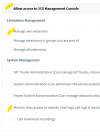
Basically, this option is all you need to grant access to call reports.

1681228878031.png
 
I would recommend you go over the training academy again to educate yourself.


https://www.3cx.com/docs/manual/setup-team/
You will see that system admin doesnt have access to reports and recordings.

Basically, this option is all you need to grant access to call reports.

View attachment 35109
I can confirm this does not work, the only way even with that selected is to promote the user to System Owner to give them permission to do so. Same issue as mentioned by OP
 
I would recommend you go over the training academy again to educate yourself.


https://www.3cx.com/docs/manual/setup-team/
You will see that system admin doesnt have access to reports and recordings.

Basically, this option is all you need to grant access to call reports.

View attachment 35109
I recommend you go and educate yourself on how to be a professional.

Not to mention your solution is WRONG and DOES NOT WORK.

Is this the quality of support we should expect from 3CX? Deplorable.
 
  • Like
Reactions: MaximeDufour
I recommend you go and educate yourself on how to be a professional.

Not to mention your solution is WRONG and DOES NOT WORK.

Is this the quality of support we should expect from 3CX? Deplorable.
Lets see...
1. You are getting free support on a public forum and your first sentence is to throw an attitude. Great way to start when you want some help.
2. You're a brand new user, with just this one post and a free tag. If it's a free system signed up in the past few months it's 3CX's Free setup, but you are in the On-Prem forum - a different product. So you are likely posting about a different product with a different interface/options.
3. You're accusing someone of professionalism issues, in the most unprofessional way possible.
4. You can't spend the extra 3 seconds to see that the username doesn't have "3CX" in it, nor the staff tag. Yet this is "quality of support we should expect from 3CX" according to you.
5. You're replying to a 4 month old post that is several releases old. Things have changed.

Here's my recommendation. Sign off and check yourself. Learn how to ask for help in a manner that will make people want to assist you. Pay for support from 3CX at $75 per ticket if you want "quality of support we should expect from 3CX". Edit your post and apologize to someone who has been here for 7+ years and is one of the most helpful users here, with almost 4000 messages. Yes, all those posted for free for the benefit of people who need help, for free, while not being an employee of 3CX. And based off "reaction" (likes) score, voted #11 as most helpful - more then several 3CX staff members.

NOTE: I am ALSO not a 3CX Employee.
 
Thank you all for answering the forums and sharing your expertise and knowledge.
@SweetAction @brenulti @kieferschild @ElementalWindX and @TSlocum
Please kindly note that 3CX does not tolerate any kind of disrespectful behaviour or behaviour that does not reflect our policies @FiLThYFreaK

However, for the sake of hopefully providing a helpful answer, try setting the role of the user as a Manager instead of System Owner and all check boxes should be available to be checked depending on what you need that user to have access to.

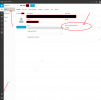
Please also note that if a user is in multiple groups, a main group membership has to be chosen. Currently, this can only be done from the WebClient > Admin tab > Users > click on the user you need > choose which group's settings this user will follow:

Please try this and let us know if the user is still not seeing the call logs.

1693568419231.png
 
  • Like
Reactions: Evolute IT
Lets see...
1. You are getting free support on a public forum and your first sentence is to throw an attitude. Great way to start when you want some help.
2. You're a brand new user, with just this one post and a free tag. If it's a free system signed up in the past few months it's 3CX's Free setup, but you are in the On-Prem forum - a different product. So you are likely posting about a different product with a different interface/options.
3. You're accusing someone of professionalism issues, in the most unprofessional way possible.
4. You can't spend the extra 3 seconds to see that the username doesn't have "3CX" in it, nor the staff tag. Yet this is "quality of support we should expect from 3CX" according to you.
5. You're replying to a 4 month old post that is several releases old. Things have changed.

Here's my recommendation. Sign off and check yourself. Learn how to ask for help in a manner that will make people want to assist you. Pay for support from 3CX at $75 per ticket if you want "quality of support we should expect from 3CX". Edit your post and apologize to someone who has been here for 7+ years and is one of the most helpful users here, with almost 4000 messages. Yes, all those posted for free for the benefit of people who need help, for free, while not being an employee of 3CX. And based off "reaction" (likes) score, voted #11 as most helpful - more then several 3CX staff members.

NOTE: I am ALSO not a 3CX Employee.
1. I worded my first sentence exactly the same as the person I quoted. Do you think they are throwing attitude, or just me?
2. Why do you bring up my account age? How is this relevant to the discussion at all?
3. Please elaborate where I was being unprofessional? Because I used caps to get a point across?
4. Probably the only point you make that is legitimate.
5. Are you trying to suggest that his solution would have worked 4 months ago? And no, it would not have worked.

As you mentioned the OP have been here for 7 years but yet they are still confidently posting incorrect answers whilst patronizing others. Get off your high horse mate.
 
  • Like
Reactions: MMDTerry
For the sake of continuity I again re-read the OP and decided to test my instruction. I can confirm that yes, it seems role based permissions takes over explicit which is odd.

More info can be found here https://www.3cx.com/docs/access-roles/

1693811460766.png
1693811474565.png

In this instance I think setting the role to manager would have resolved the issue.

@FiLThYFreaK give your fingers a rest mate.
 
Status
Not open for further replies.

Forum statistics

Threads
111,974
Messages
590,081
Members
164,899
Latest member
mazet