Why did 3CX remove the ability to send a Welcome Email?

Thiek

Premier Customer
Joined
Dec 5, 2017
Messages
134
Reaction score
27
Trying to understand what the logic is for taking this feature away? I read this post https://www.3cx.com/community/threads/v20-how-to-send-welcome-email.123736/ but it does explain why. We do not use the Webclient, yes we still use a desk phone, it works the best for all of our facilities, huge warehouses with people coming and going to their work stations as to say a little office where people sit stationary at a desk with a little headset. People are coming/going and don't have time for headset, they also need to hear phone ringing and not just their own. And a reset to send a welcome will reset their desk phone authentication creds, email pin, etc. which is mess for us, plus again nobody is using the webclient so now this introduces a new layer of messiness.

The welcome email was great for people who forgot their email pin. We also modified the welcome to include hyperlinks to documentation that covered how to use their desk phone, how to use a handle-held mobile device, how work paging system... etc. It was very handy and now another thing taken away just like parking a call at a virtual/dummy extension.

I really hope this comes back in the near future, Welcome Emails that is, and the old way of parking calls under a dummy ext. would be nice.
 
  • Like
Reactions: moniputerPBX
You can use the api at the following to resend a welcome email, it is currently python but can be converted over.
You will need to provide the fqdn, user id, and bearer token

Code:
url = f"{fqdn}xapi/v1/Users({id})/Pbx.SendWelcomeEmail"
headers = {'Authorization': f'Bearer {access_token}'}
try:
    response = requests.post(url, headers = headers)
except:
    #handle error as needed
 
powershell:
Code:
Invoke-RestMethod -uri "https://$tcxurl/xapi/v1/Users(1234)/Pbx.SendWelcomeEmail" -headers $headers -Method POST -ContentType "application/json"
 
not sure what you're referring to?

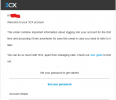
3CX still sends welcome emails.


1742458293796.png

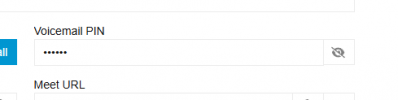
If they've forgotten their PIN then they can just get it from the app
1742458336888.png

If they cant get it from the app (because they've forgotten that password too then they can request a password reset or admin can push this via the "reset password" which is the same as the "welcome email".
 
If they cant get it from the app (because they've forgotten that password too then they can request a password reset or admin can push this via the "reset password" which is the same as the "welcome email".
That's not quite the same, that's how we see it.

The user has to actively do something to trigger the process. It's actually very simple but unfortunately many people have problems with it. They're just users. They just want to use it. They just want it to work. They don't want to deal with IT.

If the admin triggers the reset password function, all user passwords are always reset, all devices are immediately disconnected and the user or admin must react immediately because nothing works anymore.

Sending the welcome email without any password change works a little differently.

The best comes last.
With the API and this call, we can automate the entire process:
  1. give the user a single, specific email address
  2. send the welcome email
  3. remove the email address (because many phone users don't have a own unique email address and shouldn't, etc.)
  4. read the email from the specifically assigned mailbox (via IMAP) and remove it there
  5. read the password reset URL from the email
  6. call this URL
  7. assign a unique, complex password known to us
  8. set it and that's it
This is also suitable for mass use.
 
Last edited:
If the phones are able to communicate with the provisioning link then resetting the ext password simply gets pushed to the phone again as a provision.

If the user triggers a "forgot password" then the only thing that changes is the user's password
 
  • Like
Reactions: Evolute IT
If the user triggers a "forgot password" then the only thing that changes is the user's password
The user has to actively do something to trigger the process. It's actually very simple but unfortunately many people have problems with it. They're just users. They just want to use it. They just want it to work. They don't want to deal with IT.

If the admin triggers the reset password function, all user passwords are always reset, all devices are immediately disconnected and the user or admin must react immediately because nothing works anymore.
 
If the phones are able to communicate with the provisioning link then resetting the ext password simply gets pushed to the phone again as a provision.
 
No, not a smartphone. Not tested on dect. The list of devices that are detached without full reprovisioning is longer.
 
ah i forgot about the app. yeah it is what it is unfortunately
 
Other phones also.

A big request to you: I don't want to have to argue with you about the difference between resending the welcome email (which is no longer available in the administration since 3CX v20), a password reset by a user, and a user reset by an administrator. Others have already done this and have been doing it for over a year.

This feature still allows us to do that and automates it for us. That's exactly what the original question was about.

This doesn't have to become a trench war. please :)
 
I've also experienced issues where after the user resets their password via the link in the portal, or via another technician doing the "reset password" link the phone never properly reprovisions and then I have to go through the latest backup xml file to pull the previous web console password to be able to login and reprovision it.

Being able to trigger just sending the welcome email for a user without resetting the sip auth id/password, deskphone password, and voicemail pin is pretty beneficial. I understand why resetting the password changes all of the above but seeing as the api endpoint still exists to just trigger the welcome email without resetting everything else it would be nice if it was an option as to what gets reset as opposed to defaulting to the below api endpoint with everything set as true


Code:
    Pbx.RegenerateOptions:
      value:
        ConfigurationLink: true
        DeskphonePassword: true
        RpsKey: true
        SendWelcomeEmail: true
        SipAuth: true
        VoicemailPIN: true
        WebclientPassword: true
 
Going back to what I posted, the on-site phone admin could trigger a quick "Welcome Email" which was sometimes used to remind a user of what their pin is, or it was used when someone moved to a new position and is now sitting at a desk with a desk-phone which may or may not have voicemail but the Welcome Email included links to customized documentation on how to use their desk phone, or perhaps the company issued scanner-smartphone with specialized applications loaded, or the document that contains our instructions for the whole-building-paging-system and the various paging zones, abbreviated v-mail setup instructions, etc. which means I do not want to reset all their passwords to trigger the Welcome... so what was the logic for removing this feature?

Reminder, we do not use the webclient. Which means Reset will not work for us as it creates new issues with employees.

It seems it would be very easy to have both, a reset and welcome button.

3CX developers either assume everyone is using headsets and the webclient or they are trying to force us into. For now, we will have to manually copy/paste information into a Microsoft Exchange emails and send to users. I'll also look into what Colby D. and fxbastler posted about using an api.
 
  • Like
Reactions: fxbastler
Going back to what I posted, the on-site phone admin could trigger a quick "Welcome Email" which was sometimes used to remind a user of what their pin is, or it was used when someone moved to a new position and is now sitting at a desk with a desk-phone which may or may not have voicemail but the Welcome Email included links to customized documentation on how to use their desk phone, or perhaps the company issued scanner-smartphone with specialized applications loaded, or the document that contains our instructions for the whole-building-paging-system and the various paging zones, abbreviated v-mail setup instructions, etc. which means I do not want to reset all their passwords to trigger the Welcome... so what was the logic for removing this feature?

Reminder, we do not use the webclient. Which means Reset will not work for us as it creates new issues with employees.

It seems it would be very easy to have both, a reset and welcome button.

3CX developers either assume everyone is using headsets and the webclient or they are trying to force us into. For now, we will have to manually copy/paste information into a Microsoft Exchange emails and send to users. I'll also look into what Colby D. and fxbastler posted about using an api.
In the same 2 clicks for your phone admin to go User > Send Welcome email they can open up the extension and click the voicemail tab to get the PIN
 
for your phone admin to go User > Send Welcome email
Then I must have missed something, my bad, really.

When I go to Admin / Users in 3CX v20 management or even access the user as an admin I have no option to click 'Send Welcome'.

Please take a screenshot of this dialog and enlighten me, I'm serious.
 
Then I must have missed something, my bad, really.

When I go to Admin / Users in 3CX v20 management or even access the user as an admin I have no option to click 'Send Welcome'.

Please take a screenshot of this dialog and enlighten me, I'm serious.
I wasnt saying its possible, I was just saying that previously the admin would do that
 

Latest Posts

Forum statistics

Threads
111,964
Messages
590,003
Members
164,869
Latest member
hpgitsupport