Why is the SIP Login and SIP Password stored in the "welcome mail" and accesible by "ProvisioningUrl" externally and internally in plain text?

Status
Not open for further replies.

Fabio Colbrelli

Joined
Feb 16, 2017
Messages
49
Reaction score
2
If you check the "welcome mail" .cofig file you can see all the password needed for a sip client to log in as extension and start doing calls needed in plain text...

The same happens if you check this location on your computer after 3cx is installed and set up: C:\Users\%username%\AppData\Roaming\3CXPhone for Windows

There you can find the 3cxPhone.xml file with the ProvisioningUrlExternal URL:

https://%externalpbxurl%:5001/provisioning/%pbxnumber%/TcxProvFiles/3cxProv_%number%_%extensionnumber%.xml

By visiting this URL you can see the extensions username and password in clear text and start using them for calls...

For my knowing this is a big security issue, I ask 3cx for feedback. When will this issue be solved...

The URL can be accessed from the internet directly...
 
@3CXger Can you please give us some feedback => thanks
 
Dude stop. Don't tag people in posts, you'll get banned.

Be patient, they will answer when they get to you.
 
  • Like
Reactions: Fabio Colbrelli
The alphanumerical provsubdir, in combination also with the random alphanumeric characters at the end of the filename, is a string long enough to prevent any bruteforce attempts.

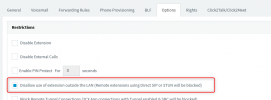
In the unlikely scenario that someone does indeed somehow find the SIP credentalials, if you have the "Disallow use of extensions outside the LAN" checked, as it is by default, then nobody can external can register anyway. Note that this option is checked by default and only needs to be unchecked if you are using STUN IP Phones (one of the reasons we recommend SBC).
1622120263876.png

So while yes, the information is in clear text:
  • It is highly unlikely that someone can get it without having any prior knowledge of the provsubdir
  • You can't register against an extension even if you do have the SIP credentials, unless you have explicitly unchecked the aforementioned option

Apart from this, let's not also forget Network Security, where you can limit SIP Traffic to port 5060 from only certain Public IPs, so in this case even STUN IP Phones would be safe.

Sure, it would be ideal to have it salted or hashed in some way, but there are some practical difficulties with this, although it is something we have in mind.
 
The alphanumerical provsubdir, in combination also with the random alphanumeric characters at the end of the filename, is a string long enough to prevent any bruteforce attempts.

In the unlikely scenario that someone does indeed somehow find the SIP credentalials, if you have the "Disallow use of extensions outside the LAN" checked, as it is by default, then nobody can external can register anyway. Note that this option is checked by default and only needs to be unchecked if you are using STUN IP Phones (one of the reasons we recommend SBC).
View attachment 22197

So while yes, the information is in clear text:
  • It is highly unlikely that someone can get it without having any prior knowledge of the provsubdir
  • You can't register against an extension even if you do have the SIP credentials, unless you have explicitly unchecked the aforementioned option

Apart from this, let's not also forget Network Security, where you can limit SIP Traffic to port 5060 from only certain Public IPs, so in this case even STUN IP Phones would be safe.

Sure, it would be ideal to have it salted or hashed in some way, but there are some practical difficulties with this, although it is something we have in mind.
Thanks for the feedback and the option to "Disallow use of extension outside the LAN" I'm wondering why with this option set the mobile app and windows phone app are still working outside the LAN => Is only Direct SIP or STUN blocked?

What can I understand from inside the lan everthing that is connecting to the internal IP or only the subnet that the phoney system has an ip from? Im asking regarding having multiple subnets and if this setting could cause some issues on there...lets say our LAN has the subnet 192.168.0.0/24 and our wlan has the subnet 192.168.1.0/24 would phones in the wlan still be aeble to connect to the PBX in the LAN subnet?

Is the ip that request the xml also blocked after a few attempts of trying to find out what could be an xml? Or how do you prevent brutforce attempts?
 
Thanks for the feedback and the option to "Disallow use of extension outside the LAN" I'm wondering why with this option set the mobile app and windows phone app are still working outside the LAN => Is only Direct SIP or STUN blocked?
This is because the Apps use the Tunnel, not Direct SIP. That option only cuts Direct SIP registrations.

What can I understand from inside the lan everthing that is connecting to the internal IP or only the subnet that the phoney system has an ip from? Im asking regarding having multiple subnets and if this setting could cause some issues on there...lets say our LAN has the subnet 192.168.0.0/24 and our wlan has the subnet 192.168.1.0/24 would phones in the wlan still be aeble to connect to the PBX in the LAN subnet?
"Outside the LAN" is considered any IP that is not in the ranges defined by in RFC1918 (10.0.0.0/8, 192.168.0.0./16, 172.16.0.0/12).
The "Disallow use of extension outside the LAN" does not affect requests coming from these IPs


Is the ip that request the xml also blocked after a few attempts of trying to find out what could be an xml? Or how do you prevent brutforce attempts?
No, these requests are not subject to blacklisting after certain attempts, but as I mentioned, the combination are so many if you factor in the provsubdir random string + the filename random suffix, it would take years to bruteforce, because bear in mind that while this is not subject to blacklisting, there is a rate limit, so you cannot try 2000 combination per second...
 
One solution to this issue could be flowing:

1. On the extension there is a need to set an activation password that only is valid for an amount of time and for one activation
2. Send the activation password by mail
3. Activate mobile app with the config file that only has this password in it
4. As soon the activation is done no more activation can be done with the same activation password
4. Store the password of the extension encrypted with an private key per extension something like that or what even would better to not having it stored at all...

Can you give me a date when this issue will be solved? For my understanding even with the disallow use of extension outside the lan you still are able to get the xml and activate a 3cx Windowsclient with it, this one is not blocked at all. You only have to rename the xml file with the right ending.

Thanks for your feedback
We are using 3cx for years now and think its a great pbx we just want to make it more secure, that would be great...
 
Look, this won't change anytime soon. If you think this is a security hole, then use another system. 3CX has tested and pen-tested the system for years, on each release. We all use a randomized provisioning URL, and never had issues with it.
 
  • Like
Reactions: charles
Can you give me a date when this issue will be solved? For my understanding even with the disallow use of extension outside the lan you still are able to get the xml and activate a 3cx Windowsclient with it, this one is not blocked at all. You only have to rename the xml file with the right ending.
We don't view this as an issue that requires "solving". Sure, there are certain things that can be done to improve it, but these will be viewed as "improvements" and currently there are no immediate plans for this.
 
  • Like
Reactions: Evolute IT
Status
Not open for further replies.