will 3CX PBX server on DCHP IP WAN stop working if IP is changed?

Status
Not open for further replies.

mike louis

Free User
Joined
Nov 2, 2021
Messages
6
Reaction score
0
if I install 3CX PBX server on windows based on DCHP IP WAN address, and all extension phones are in the same LAN, if IP is changed, will it stop working? it's not recommended by 3cx, but I want to know what will happen. I know mobile app or client outside of same LAN may have problems. Shall I not install SBC ?
 
I am not sure if you are asking what happens if your wan ip changes or if you are asking if you change the 3cx servers lan ip address.

Wan:
When your wan ip changes that will not affect the lan, it may change how the sip trunks you are using terminate and authenticate and your 3cx fqdn may not reflect the new ip until it updates dns.

Lan:
When you change the lan ip to the server you will need to change the config in each phone or just change the provisioning server with dhcp option 66. sometimes phones are uncooperative, phones > phone provisioning tab > ip phone > make sure lan phones are set on local lan and select the new interface if it is wrong.
 
  • Like
Reactions: Evolute IT
Wan - if this changes, set 3cx wan to be dynamic and not static.

3cx will update the 3cx fqdn for you. If you use your own fqdn, you will have to change the dns yourself

If you are using sip ip registered trunks, the sip trunk may not be registered - you may need to change the allowed IP address within the sip control panel.

Wan IP address has no affect on the lan devices, as they point to the 3cx internal IP address
 
Last edited:
  • Like
Reactions: nub
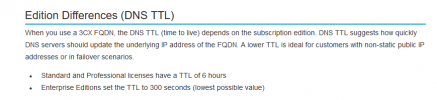
Note that the 3CX FQDN TTL on domains are as follows:

1635929280543.png

Although it's more than likely this will be much sooner. External devices may not be able to communicate with the FQDN until the DNS server that's serving them have been updated.

I would recommend you stick your PBX in to the cloud, stick an SBC onsite and run this way.
 
Just want to add that for the LAN IP you actually have to update it in the Management Console >> Network settings too.

For anyone else reading this, as already mentioned above, we recommend a static IP both for WAN and LAN for production environments and may also suspend support for issues deriving from the use of dynamic ips and will not proceed until they have been set to static.
 
Status
Not open for further replies.

Forum statistics

Threads
111,975
Messages
590,084
Members
164,903
Latest member
dross