Windows APP does not pop up

Status
Not open for further replies.

hctservice

Silver Partner
Advanced Certified
Joined
Aug 22, 2011
Messages
14
Reaction score
0
Hi guys,

I can't find a solution. How can I set the windows app to pop up when a call comes in?

The version 18.10.461 is installed.

Thanks a lot.
Marc
 
Hi @hctservice

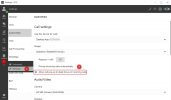
Navigate from the 3CX Desktop App to Settings>>Audio/Video and enable the option "Allow call pop-up to steal focus on incoming calls".
2023-01-05_13h54_48.png
 
Hi Nikolas,
thanks a lot.
It would never have occurred to me to search under AUDIO.
:)
 
You are very welcome!

We are glad to be of assistance!
 
You are very welcome!

We are glad to be of assistance!
Hello Nikolas, I can't seem to find this option in the web app, has this been moved?
 
Mine's not working either, with Edge or Chrome PWA. Accept push notifications is on. If its minimized you hear the ring but no pop up. If it's closed nothing happens.
 
Mine's not working either, with Edge or Chrome PWA. Accept push notifications is on. If its minimized you hear the ring but no pop up. If it's closed nothing happens.
Hi 3CX...
I'm having exactly the same issue...can hear the ring in the 3cx PWA app installed.
Browser is set to allow Notifications from my system's website.
App is set to auto-start, and it does indeed auto-start, but no visual pop when incoming call..
Any assistance here would be welcome, we are planning a go-live in a few weeks, but this will prevent us going live...
 
Hi @hctservice

Navigate from the 3CX Desktop App to Settings>>Audio/Video and enable the option "Allow call pop-up to steal focus on incoming calls".
View attachment 33421
This does not seem to be an an option anymore. I'm Edge user which shouldn't make a difference, but tried in Chrome as well as the same thing.
 
I've followed that pwa-push-notification guide to a T on multiple PC's on different networks, with different users etc. and I never get any kind of visual notification that calls are coming in. Only a ringing sound and have to open the app to answer calls. I've heard the desktop app is going away in v20 - I really hope they get this web PWA app up to snuff!
 
Hi all - we've got the same issue. Moved 150 users to the PWA version from the Windows app and now they are saying the popups have stopped working. They are using Edge. Are any staff members on this forum from 3CX able to comment if the new V20 will fix this (or even if we can do this on the current PWA)?
 
Hello @Dupablada,

The option mentioned by my colleague is only available in V18 Desktop App.

For PWA we have the following guide(https://www.3cx.com/blog/docs/pwa-push-notifications/), in order to receive pop-up notifications on incoming calls.
Hi @GeorgeP_3CX ,and @NikolasA_3CX , Could you please advice if there is any ways to sort this out in 3CX Windows application. My client is using windows app as he finds it simple and easy to use and wants to stick with it.
 
Can you please clarify which Windows App?
PWA, Desktop App or the V20 Softphone?
 
Hi @TheodorosG_3CX,
Its 3CXPhoneforWindows16.msi, type of file is Windows Installer Package (.msi).
1712551681532.png
 
This is the Legacy Windows client and no further implementation is provided.
I would suggest to use the Web Client or PWA. If you are on V20 use the latest V20 Softphone and let us know.
 
Sure, thank you very much for your prompt response.
 
You are welcome ;)
 
Status
Not open for further replies.