Windows Client EOL ?

Status
Not open for further replies.

lav180

Customer
Advanced Certified
Joined
Mar 17, 2008
Messages
10
Reaction score
0
Hi All,
Most of my customers ues and like the Windows Client

On the Portal Downlaods it's listed as 3CX Windows Client (Legacy)

I've been trying to find when it's going EOL so that my customers can start getting used to the Windows App or Browser (pretty much the same thing) but I can't find a date when it will disappear ?

Does anyone have an actual date or release version where it will stop functioning ?
Cheers,
Pete
 
Hi Pete,

At the time of writing, there is no fixed date when the 'legacy' Windows Client will become EOL. Right now it is End of Development.

Despite this though, we have kept some legacy code in the 3CX Server software that allows the old client to still function.

We don't have immediate plans to remove it, but if there is a need at some point in the future, we shall do so. I imagine that due that the old client is still quite popular, there will be some warning about it.

I suppose what I am trying to say is, for the legacy Windows Client, it is the end of the road. What users need to migrate to is the the new Desktop App. While it isn't a hurry now to do this, you should slowly start and FOR SURE not install it for new customers.
 
I totally understand the business reasons why 3CX would like to retire the legacy client, but it does have some feature advantages:
  • Native client side CRM Plugins
  • Integration with Microsoft Outlook (outbound dialing)
  • Registers with an IP address – good for our Emergency Notification location service
  • Support for multiple profiles
I would hate to lose these features.
 
I'm with VOIPTools here - the native client allows me to trigger an EXE passing along extension and calling number for a custom CRM integration. Loss of it would be devastating to our clients.
 
  • Like
Reactions: CentrexJ
I'm with VOIPTools here - the native client allows me to trigger an EXE passing along extension and calling number for a custom CRM integration. Loss of it would be devastating to our clients.
Some things take time, and as I said, we don't have immediate plans to remove it.

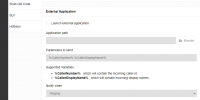
I hope I don't get in trouble, but as you can see we are working on some things:
1642769955777.png

(don't ask for an ETA, it is still WIP)
 
Are there plans to allow the new Desktop App to control another instance, similar to the way you can control the Windows Client with the Desktop App/Web Client. We have remote workers using the Desktop App on their remote desktops to control the Windows Client on their laptops, losing this functionality would cause a serious problem.
 
Are there plans to allow the new Desktop App to control another instance, similar to the way you can control the Windows Client with the Desktop App/Web Client. We have remote workers using the Desktop App on their remote desktops to control the Windows Client on their laptops, losing this functionality would cause a serious problem.
This is something that other have also pointed out and it we are taking these comments into account.
Currently I don't have something to share on this though, but as you said, for the time being you can continue working with your current setup.
 
  • Like
Reactions: bbaker73
Status
Not open for further replies.

Forum statistics

Threads
112,349
Messages
592,027
Members
165,514
Latest member
megalmazan