


- Joined
- Feb 15, 2021
- Messages
- 3
- Reaction score
- 1
I have a three monitor setup. One of the monitors is a hi-def monitor and the other two are 1080p monitors. Unfortunately the Windows client has decided that it is only going to display with zero scaling at all and so appears as a very small, unreadable, unusable application no matter which monitor it is on.
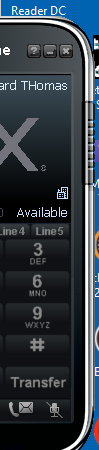
When being dragged from the hi-def screen to a 1080p screen, it recognises the resolution change for part of the drag. This image is of it half way onto the 1080p screen:
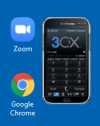
And here is what it looks like when it is finally completely on the 1080p screen. Those are two standard icons next to it.
I have three staff who are supposed to be using this client instead of desktop phones in the near future. This obviously isn't going to be possible if the client cannot be resized or displayed at a reasonable size.
Does anyone have a solution for this issue?
Thank you.
When being dragged from the hi-def screen to a 1080p screen, it recognises the resolution change for part of the drag. This image is of it half way onto the 1080p screen:
And here is what it looks like when it is finally completely on the 1080p screen. Those are two standard icons next to it.
I have three staff who are supposed to be using this client instead of desktop phones in the near future. This obviously isn't going to be possible if the client cannot be resized or displayed at a reasonable size.
Does anyone have a solution for this issue?
Thank you.


