Windows Desktop App v18 - CTI

Status
Not open for further replies.

cotterse

Customer
Joined
Aug 13, 2021
Messages
3
Reaction score
0
Hello,

I've just upgraded my 3CX from v16 to v18. In Windows App v16, I can use CTI (not softphone). How to do the same thing in v18 ?

Thanks.

Regards
 
The windows application has not changed in V18

Are you talking about the new 3CX windows desktop application ?
 
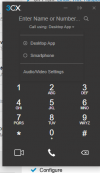
If you open the dialer window (phone icon) does the Call Using dropdown list your phone?
 
  • Like
Reactions: VasilisV_3CX
Do you have any handsets assigned to extension, but you should see your phone

1628871940202.png
 
  • Like
Reactions: VasilisV_3CX
I have just Desktop App and not my physical phone (DECT).
 
I have just Desktop App and not my physical phone (DECT).
DECT devices in 3CX don't support CSTA as we do not enable it for technical reasons.
The new Desktop App works like the WebClient, that's why you don't see it.

The best thing to try is to enable PUSH and register your Mobile Device on that extension, then in the drop-down Saqqara shows, select "Smartphone".
Now when you dial, it may dial your DECT device as well, along with the Smartphone.

The new Desktop App does not support CTI the way the legacy Windows App did.
Keep in mind that the legacy App is not deprecated and will remain working for now at least, so you could continue using it.
 
  • Like
Reactions: mcsphones
The new Desktop App does not suppor CTI the way the legacy Windows App did.
Keep in mind that the legacy App is not deprecated and will remain working for now at least, so you could continue using it.
Good to know. I have a few customers who rely on it. For example, they go to their LOB application, Ctrl-F to find a person, then they copy/paste the desired number to call in the 3CX Windows app and hit Enter and it begins calling. Not many use this, but there are some.
 
Yes, but does it CTI to the deskphone or initiate the call via softphone? Some customers still want deskphone hardware.
 
Yes, but does it CTI to the deskphone or initiate the call via softphone?
The new Windows Desktop App does support remote controlling supported Deskphones the same way the WebClient does.
This is done using CSTA.

Note: as I mentioned above, we don't support CSTA for DECT devices.
 
  • Like
Reactions: Evolute IT
Has anybody tested CSTA on a Gigaset N870 DECT base with v18?

I know - it is not supported by 3CX but works well on my v16 for 2 years now.
 
Has anybody tested CSTA on a Gigaset N870 DECT base with v18?

I know - it is not supported by 3CX but works well on my v16 for 2 years now.
While we don't test CSTA on any DECT devices, if it worked on V16, it *should* work on V18 as well.
As you said though, we don't support it, so if you see any weird behavior like stuck calls, calls being rejected, and strange things with transfers, try disabling it, then trying again.
 
  • Like
Reactions: Evolute IT
IIRC with DECT we could only use makecall, right?
What is used for controlling the windows app from the desktop app? And why is the android/ios app not controllable in the same way?
 
What is used for controlling the windows app from the desktop app? And why is the android/ios app not controllable in the same way?
The Windows App maintains a constant connection to the 3CX Server, so when when controlling it from the Desktop App, the 'command' goes via the Presence.

The Mobile Apps don't maintain a constant connection to the server for battery saving, so they need to be 'woken up' via PUSH. This is done via the the MakeCall call.
 
Status
Not open for further replies.

Forum statistics

Threads
112,349
Messages
592,027
Members
165,513
Latest member
megalmazan