Windows Legacy App, CTI, E.164

Status
Not open for further replies.

ichbins

Customer
Joined
Dec 19, 2022
Messages
4
Reaction score
0
Because of the security incident, we switched to the windows legacy app. The users who use the app as a softphone do not have any problems. For users with a desktop device, however, dialling using the app is not possible. All numbers are stored in E.164 format. In CTI mode, the "+" sign is not transferred. Is there a workaround here?
 
Hi,

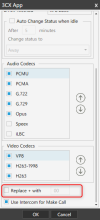
Please navigate under 3CX Phone For Windows legacy app Settings > Configure Accounts > Double Click on your account > Advanced Settings (button) > Scroll down and the option to replace the "+" symbol is located there

1681217477498.png
 
  • Like
Reactions: ichbins
Status
Not open for further replies.

Latest Posts

Forum statistics

Threads
112,018
Messages
590,316
Members
164,963
Latest member
DenisK