Wordpress Plugin 3CX Version: 10.0.10 does not work on Wordpress Version: 6.3.1

Status
Not open for further replies.

AntDX316

Free User
Joined
Sep 11, 2023
Messages
8
Reaction score
0
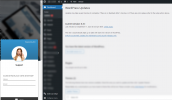
3CX Wordpress Plugin does not work
Version 10.0.10 does not work.
You have to update it so it's compatible with Wordpress compatibility version: up to 6.3.1.
It just says 6.2.2 which makes the icon not clickable to do chats.

Have your engineers test it. It does not work on Wordpress 6.3.1!!
 
This is fully tetsed and working with the latest version of wordpress and 3CX Chat plugin.

Have you checked the website address that you have eneterd under Live chat configuration is correct, within the admin console?


1694453740435.png

1694453727958.png
 
oh because I had to do in Edit Live Chat:
1694506478042.png
 
This is fully tetsed and working with the latest version of wordpress and 3CX Chat plugin.

Have you checked the website address that you have eneterd under Live chat configuration is correct, within the admin console?


View attachment 37207

View attachment 37206
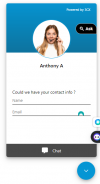
How do I change the name of this or at least who shows up?? I've renamed it from my full name but I want it to say something else like isv.social Chat instead of Anthony A
1694506897833.png
 
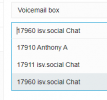
Also I've deleted 17960 but it still shows up as selectable option?? How do you have it delete completely?
1694507075663.png
 
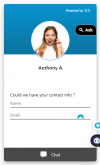
How do you make it not ask their name and email? I want them to be able to ask without going through that.
If I want that, I would like a button to display a form inside the chat box.
1694509392554.png
 
Status
Not open for further replies.

Forum statistics

Threads
112,331
Messages
591,921
Members
165,483
Latest member
AshleyStokes