Wrong license key in backup migrating from hosted to self-hosted

Status
Not open for further replies.

GplusU

Customer
Joined
Jul 25, 2022
Messages
12
Reaction score
3
Hello!

I'm trying to migrated from hosted to self-hosted.
I've stopped hosted 3cx, clicked on Install, answered YES to "do you have a backup to restore", chose latest full backup, but I get an error with the license key in backup, as you can see from the screenshot.

Any idea what is wrong?

Also, can I leave Unchecked the "use alternative port" if I've stopped the currently hosted instance?
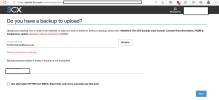
gplusu.png

Thanks, have a sweet day!

Post edited by a moderator: Please don't post screenshots that contain license keys, passwords or other sensitive data..
 
  • Like
Reactions: Evolute IT
I've tried again today with an unencrypted backup, still the same error message.
When I check the XML file in the backup, the license key is the right one.
So I cancel the operation since there is anything I can do.
When I come back to the customer portal, I can see a new instance, uninstalled of course, with all my contact info (as in the backup) but with a new license key I don't own.

Any help would be appreciated! Thank you!
 
What provider are you moving to? Most you can build the VM yourself instead of using the wizard, so that you can configure the whole thing manually and upload the backup in the setup screen.
 
Thanks a ton for taking time to reply.
I plan to move to Azure as I have monthly credits.
But during the migration, the backup file is requested on the first step, the wizard has not yet asked for the provider.

What I'd like to know is if I can have the whole hosting auto setup by the wizard without the backup then restore it and get all my settings back?

Thanks again!
 
You can indeed configure the system first, then upload the backup via SFTP and restore it.

That being said, the easiest is to use the Azure marketplace image of 3CX. It should allow you to restore your backup as the first step once in the setup wizard (IP:5015.)
 
Thank you so much for your solution!

What I'd like is to be sure the hosting on Azure won't be oversized for my needs (it's just a 4SC Pro I'm the only person to use), what would work best here? 3CX wizard or Azure marketplace?
Because I'm not sure what I do actually need for this light 3CX instance.
And wouldn't the 3cx image in the setup wizard run into the same "wrong licence in backup" error?

Thank you so much!
 
The Azure marketplace will let you choose the VM size and storage size.

And maybe not, the backup verification of the wizard in the Portal is not exactly the same as the Setup Wizard of 3CX itself.
 
  • Like
Reactions: GplusU
Excellent!

Thank you, I'll try those solutions.

Have a great weekend
 
The Azure marketplace will let you choose the VM size and storage size.

And maybe not, the backup verification of the wizard in the Portal is not exactly the same as the Setup Wizard of 3CX itself.
Hello,

Just wanna thank you, the wizard did accept my backup and it's now up and running on an Azure VM.

Have a wonderful day.
 
  • Like
Reactions: Evolute IT
Status
Not open for further replies.

Forum statistics

Threads
111,974
Messages
590,083
Members
164,899
Latest member
mazet