Wrong Timezone on W90DM only

Status
Not open for further replies.

IPEVA

Bronze Partner
Joined
May 12, 2023
Messages
19
Reaction score
2
Hello all,

on a brand new deployed V18, with the right timezone (GMT+1), the provisioning file for the W90DM has timezone GMT-4 (Paraguay).
I tried to change the TZ to something else and then back to GMT+1, to restart services: same.
I created a new W90DM: it also contains GMT-4.

Anyone know where this mess comes from ?

David
 
Hi there.
So the timezone that the endpoint devices will receive will not be 3CX directly but from the NTP server (pool.ntp.org)
You can look into the network where the DECT is located, and it should have the ability to communicate with that NTP server.
 
Timezone provided by NTP server ?
Never heard about that.
I am not sure how this would work if I connect from Japan to a NTP server in France.
The only thing a NTP server provides must be universal, so it's UTC.

Correct me if I am wrong.
 
So the DECT will receive the configuration based on the template.
In your case, you will have a timezone GMT-4. Now the DECT will contact the NTP server to receive the time-based on that timezone you have in the settings. If it cant contact the NTP server, the time will not update.
 
ok I know that.
But why GMT-4 ?
The timezone on my system is GMT+1.
The timezone in all provisioning files for T42/T46 phones is correct.
The timezone in all provisioning files for W90DM is wrong.
 
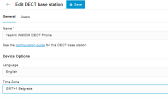
Can you go to the settings of the DECT, set the timezone from there and then again reprovision it

1711101968203.png
 
  • Like
Reactions: CentrexJ
There is no such parameter in V18.
 
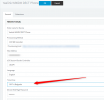
Dont you have the same option as below?

1711105340110.png
 
Your first screenshot was from web client, not legacy admin UI.
In legacy admin, I have it.
It works if I force GMT+1, but if I put back Default, it reverts to GMT-4.

It's a know issue in V18 ?
 
Great, glad to hear that you have managed to resolve the issue.
You must set the timezone as perhaps the timezone of the OS for the default was not reflecting the timezone of the DECT template.
 
TImezone of the OS is correct also.
I checked internally, and it seems it's a recurring issue with W90DM on V18.
I don't see any reason for that, as we autoprovision 3CX with setupconfig.xml, and the value for timezone in it is 45 (France).
 
What is the firmware version that your DECT running on?
 
I don't see the relationship between W90DM firmware and the fact that 3CX generates a provisioning file with the wrong timezone.

But I may be wrong so firmware is 130.85.0.35.
 
You seem really convinced that a firmware upgrade is going to change the content of the provisioning file that the W90DM pulls from 3CX.
I am puzzled.
 
That is the first thing you must do, and use the firmware that has been tested with the template the Phonesystem have.
 
I think something else is going on, loads of our clients let us know that summer hours are activated ... a week to early tho.
We even have other clients using another platform that report the same (so it's not only 3CX).
 
Yep, our system has done this too. All Yealink T42U and T46U IP phones are showing an hour ahead.
We're in Europe/London time.
 
Same here with Yealink T42U/S
 
@VoiceKing Support
@EBrooke
@dunmore98
Hi there. I think for your guys will be a different issue there and with the actual time of the phone (perhaps similar to this post), whereas for the DECT W90DM was the default settings timezone that was not working and when applying the specific timezone everything was ok.
 
  • Like
Reactions: dunmore98
Status
Not open for further replies.

Latest Posts

Forum statistics

Threads
111,953
Messages
589,917
Members
164,851
Latest member
DrunkeMeister