X3SG not blind transferring when using search contact

Status
Not open for further replies.

SHP

Customer
Joined
Jul 15, 2022
Messages
14
Reaction score
2
Hi there,

We have a mix of Fanvil X3S and some newer X3SG phones. Recently we noticed that the X3SG works differently in the blind transfer function.
  • With X3S: Incoming call, press XFER, either type or search for contact, press XFER again, blind transfer done.
  • With X3SG: Incoming call, press XFER, type extension, press XFER again, blind transfer done. However,
  • With X3SG: Incoming call, press XFER, search for contact (e.g. by name), arrow down to highlight a contact, press XFER again, a message pops up "Transfer Failed"
  • With X3SG: Incoming call, press XFER, search for contact, arrow down to highlight a contact, press OK button, it turns into attended transfer. The transferred phone has to be picked up first and finally press XFER button for transfer to succeed.
So in conclusion, only with the X3SG, blind transfer only works if we type in the extension or number. Transfers via searching for a contact will fail blind transfer and only works with attended. We have several of each phone models and they are all behaving the same way. Any adviced about this issue? Thanks!

3CX server version 18.0 Update 8 Build 917
X3S firmware version 2.14.0.7387 (3CX supported version), unmodified template
X3SG firmware version 2.4.12 (3CX supported version), unmodified template
 
Anybody have the same problem? It is supposedly 3CX fully supported phone. I have engaged Fanvil as well, they said they could not reproduce it but they are still working on it, currently they are checking the config TXT file I sent to them that 3CX provisioned for the phone.

I also have made a video of the behavior if any 3CX admins care to see it.
 
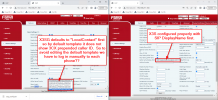
Additional issue with the Fanvil X3SG is that the "Caller Name Priority" is not configured properly by the default template. It is configured as "LocalContact" first which makes it not show 3CX's prepended caller-id (Ring groups / Trunk name not showing up on prepend setting). But since 3CX discourages editing the template then we have to edit the config on each phone manually and we have hundreds of phones to deal with...... can 3CX update the default template to fix this in the future?

1693426355224.png
 
After several back and forth with Fanvil, this is what they say:

After analyzing again with our internal team we can validate that this behavior is not a Bug.

Different phone models have different processing mechanisms. In this case the X3SG phone will process the blind transfer according to the actual input content.

So, in this case if you perform a blind transfer, please kindly search after reaching the contact and change the entered number to the contact's number.

Thanks for your valuable understanding.

Best Regards

This is a big warning to Fanvil users, their blind transfer mechanism can be wildly different as shown in this thread. Also to 3CX as you guys are recommending this phone brand as preferred brand and a function so basic as a blind transfer can make it unusable. Who at their right mind would consider this normal ?

Very frustrated. Now we have to get rid of our X3SGs and lose a lot of money.
 
After further communications with Fanvil, they have agreed to build a new firmware to change the aforementioned blind transfer behavior, their estimate is sometime mid-October. Because it will be a different / newer firmware, would 3CX be approving this new firmware?
 
Fanvil sent me a new firmware 2.4.12.2 for their X3SG which indeed fixed the Blind Transfer, so that is good. This firmware is not yet supported by 3CX so we are getting red "Not supported" messages. It would be nice if 3CX could support this firmware so we can update all our X3SG at once from 3CX admin.
 
  • Like
Reactions: JohnS_3CX
Hi @SHP

We can support firmware after the manufacturer performs the testing and releases it to us.
Keep in mind though that this part largely falls on them to carry out.
 
Great so seeing how difficult that was to make Fanvil do something, there is a possibility that this fixed firmware will never be supported by 3CX and this will add deployment complication (update firmware manually for each phone, getting red warning...) for anyone who wishes to use Fanvil X3SG (and who knows maybe other Fanvil models as well). As 3CX's preferred phone vendor, the success of the whole phone system deployment depends among other things on 3CX and Fanvil, at least we need to be warned of possible issues like this so that not to waste your customer's time and cost. Technically we are donating our time dealing with Fanvil for the success of your platform which should have been between 3CX and Fanvil. :confused:
 
Just to give some context, the specific model had reached end of life so we didn't expect to get new firmware for it, hence my reply above.

We are expecting various firmware upgrades from Fanvil, so if they certify this one too I don't think it should be a problem to release it on 3CX :)
 
What... is it really discontinued? It is not listed as EOL at Fanvil website and neither at 3CX website.
https://www.3cx.com/sip-phones/fanvil-x3-x5/ it is shown in bold that X3SG is among supported models, and the one listed as EOL is in the X3 family the X3 (no letters at the end) and X3P.
 
We were informed that it reached end of life in 2023 even though you are right, their website doesn't reflect that yet.

It's not necessarily a problem to be alarmed about though, we usually keep EOL phones in the provisioning templates so long as they still work fine for years ahead. Technically the EOL schedule is decided by the manufacturers but if they keep releasing firmware that keeps it working in the future you should be ok. We had some Yealink examples that received new firmware well after they went EOL and they still work fine today. Actually some of the phones on the Fanvil EOL page also still work as of now.
 
Sounds good. JohnS_3CX while you are watching this thread, the issue of this phone template like the Caller Name Priority setting here in post number #3, do you have a recommendation on how to approach this since we rather not have to login to individual phone and also avoiding making a custom template?

Thanks
 
AFAIK this is not included at all in the 3CX template so if you set it in your phones manually it should stay that way and remain even after reprovisioning the phone.

But if you want to set it massively on multiple phones at once you will most likely need a custom template.
 
Status
Not open for further replies.

Members Online Now

No members online now.

Forum statistics

Threads
111,835
Messages
589,289
Members
164,665
Latest member
dominik.pepel